
Diagrams in Spec-Driven Development: See What AI Builds
Spec-driven development promised to slow AI coding agents down long enough for a human to stay in charge: write the requirements, agree on a design, then let the agent build. It works. It also produces a lot of text. Birgitta Böckeler tried Kiro, Spec Kit and Tessl for Thoughtworks and said of Spec Kit's output: "I'd rather review code than all these markdown files."
I build my side projects this way, and I agree with her about the markdown. What made my reviews faster was not a better prompt. It was a picture. Every spec in my projects now carries a diagram, and the diagram is the part of the spec I check first.
I went looking for who else does this. Diagrams as input for agents are an emerging practice. Diagrams as the way to review what an agent built are almost unexplored. This post is about both, and about the diagram skill I had to rebuild because the official AWS one did not travel.
TL;DR
- Agents write faster than people read. Plans, walkthroughs and diffs are all text, and text is where comprehension debt grows.
- A software engineering diagram compresses a design into something you can check in a minute: one wrong arrow is visible, one wrong line in 1,284 is not.
- Pick the diagram by the mistake it catches: architecture or C4 for wrong boundaries, sequence for wrong call order, state for impossible states, an ERD for data-model drift.
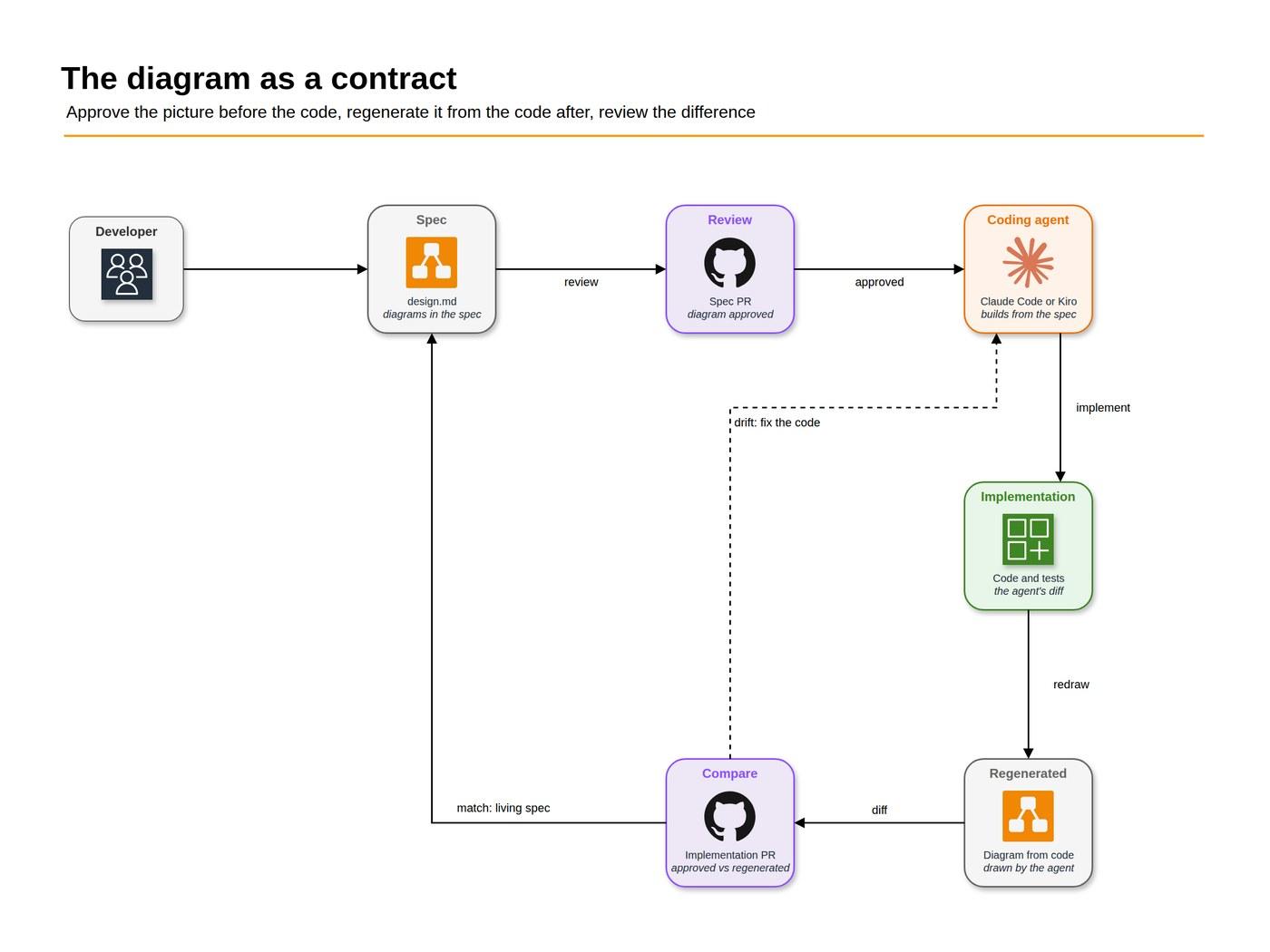
- Treat the diagram as a contract: approve it in the spec before any code, regenerate it from the code afterwards, and review the difference.
- Kiro and Cursor already put diagrams in their plans. Using them to review agent output is still rare. Tools exist for most of it; the habit is what is missing.
The review problem
An agent finishing a feature hands you a plan, a walkthrough and a diff. All three are honest, and all three are prose or code. Addy Osmani calls the result comprehension debt: the growing gap between how much code exists in your system and how much of it anyone understands. Every AI tool is getting better at producing the code side of that gap. Few are working on the understanding side.
Engineers solved a version of this problem decades ago. When a system was too big to hold in your head, you drew it. The field calls these software models, and the diagrams are their visual form: UML, C4, entity-relationship diagrams, deployment views. They fell out of fashion in a lot of teams because keeping them current by hand was expensive. That cost is exactly what agents remove. An agent will redraw a sequence diagram in seconds, as many times as you ask.
Who already does this
I searched papers, vendor docs, Hacker News, Reddit and X for anyone using diagrams to steer or review AI coding agents. Here is what exists, as of October 2026.
Diagrams as input, in spec tools:
- Kiro is the one major spec tool that puts diagrams in the default output. Its
design.mddocuments "technical architecture, sequence diagrams, and implementation considerations." - Cursor 2.2 (December 2025) added inline Mermaid diagrams to Plan Mode, so the agent streams visuals into its plans.
- GitHub's Spec Kit has no diagrams in its templates. A community discussion, Embedding Visual Diagrams (UML / Mermaid / PlantUML) Across Spec Kit Workflows, asked for them in October 2025 and got no maintainer answer.
Diagrams as input, in research:
- Architecture as Capability Equalizer for Coding Agents (August 2026) ran 90 agent trials on six models, each given the same architecture in five formats, Mermaid and C4 among them. Format barely mattered for the strongest models and mattered a lot for weaker ones, and formats close to code (OpenAPI, TypeScript contracts) helped most. More on that caveat below.
- Collaborative LLM Agents for C4 Software Architecture Design Automation has agents produce the context, container and component views of a C4 model from requirements.
Diagrams to understand code that already exists:
- Code2UML (May 2026) has agents built on the Claude Agent SDK turn repositories into UML. The diagrams are 91.5% syntactically valid, but they recover only 31% of the entities. A diagram that renders is not a diagram that is right.
Diagrams to review agent output: here the list gets short. CodeRabbit includes a sequence diagram in every pull-request walkthrough by default (its sequence_diagrams option is on unless you turn it off). Google's Antigravity lists architecture diagrams among the artifacts its agents produce. On X there are scattered tips to ask Claude for a Mermaid diagram of the plan before letting it build. That is about it. The comprehension-debt discussion, which is exactly about understanding agent output, does not name diagrams as a remedy.
So the gap is not tooling. Agents draw diagrams well enough, and every tool above can render them. What is missing is the habit of making the diagram the thing you approve and the thing you check.
Which diagram catches which mistake
"Add a diagram" is too vague to help. Each kind of software engineering diagram answers a different question, so each one catches a different class of agent mistake. These are the ones I use.
| Diagram | It answers | The agent mistake it catches |
|---|---|---|
| Architecture (C4 context and container, or a cloud diagram) | Which parts exist and who talks to whom | A new service nobody asked for, a call that crosses a boundary, a secret reaching the browser |
| Sequence | In what order things happen, including failures | Missing authorization, a skipped API layer, no error path, a retry loop |
| State machine | Which states something can be in, and how it moves between them | Impossible states, a state with no way out, a transition that skips a step |
| Entity-relationship (ERD) | What the data is and how records relate | A duplicated field, a missing owner, a one-to-many that should be many-to-many |
| Deployment | Where the code runs | A binary in the wrong bundle, a function in the wrong region, a cost surprise |
| Class | How the code is structured inside | Mostly noise for agent work; I rarely ask for one |
The academic split is useful here: structural diagrams (architecture, ERD, class, deployment) show what exists, and behavioral ones (sequence, state, activity) show what happens. Agents get the structure right more often than the behavior, so the behavioral diagrams are where my reviews find the most.
The diagram as a contract
Here is the loop I use, and the half of it I am still adding.
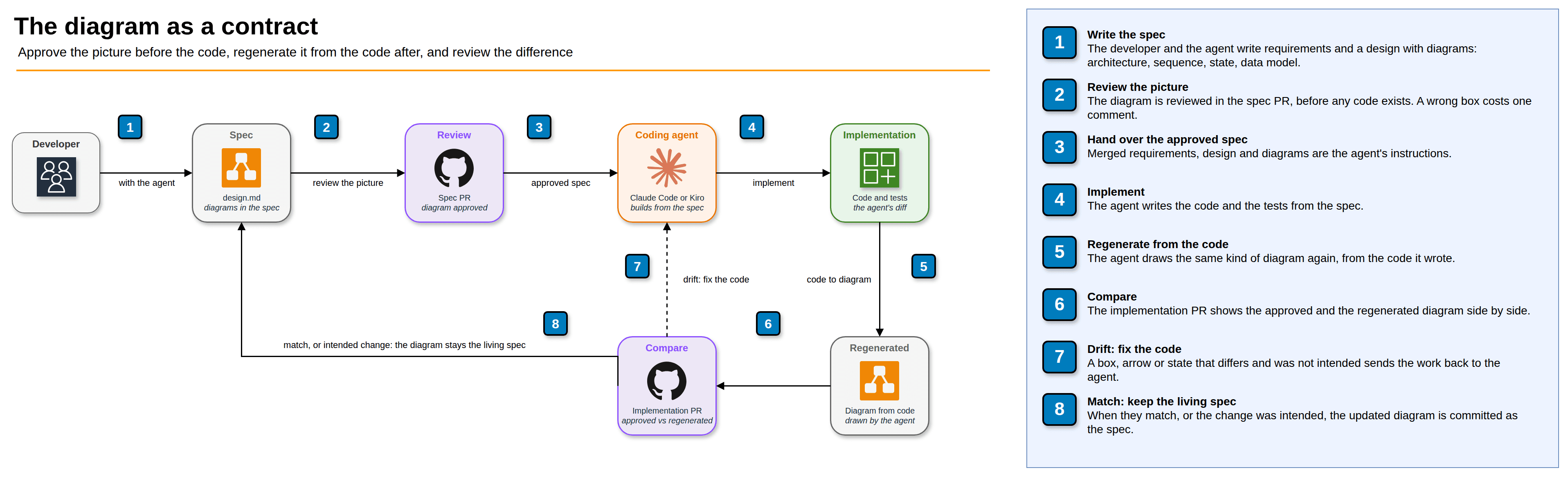
- Write the spec with the agent, including the diagrams that matter for the change.
- Review the picture in the spec PR, before any code exists. A wrong box costs one comment instead of a rewrite.
- Hand the approved spec to the agent as its instructions.
- Let it implement, code and tests.
- Ask it to regenerate the same diagram from the code it wrote. Not from the spec: from the code.
- Compare the two. A diagram written as code (Mermaid, PlantUML, Structurizr) makes this a literal diff.
- Drift that was not intended goes back to the agent.
- When they match, or the change was intended, commit the new diagram as part of the spec, so the spec keeps describing the system as it is.
Here is step 6 with an illustrative example. The agent's diff is 1,284 lines. The regenerated sequence diagram has one arrow that the approved one does not: the UI writing straight to the database, past the API. Reviewing that is a one-line job; finding it in the diff is not.
Steps 1 to 3 are how every one of my projects works today, and step 8 is already a rule: when the architecture changes, the same diagram source is edited in the same pull request. Steps 5 to 7 are the part I am adding now. Code2UML's recall numbers are the warning: a regenerated diagram can miss things, so a match is evidence, not proof. A mismatch, though, is always worth reading.
How I use diagrams in my own specs
All my projects run the same workflow: a GitHub issue becomes a Kiro spec (requirements.md, design.md, tasks.md), the spec is merged through its own pull request, and only then does an agent implement it. One rule in the workflow says every spec's design.md has an ## Architecture section with a diagram of the components the feature adds or changes. The diagram is reviewed in the spec PR together with the requirements.
I use two formats, for two jobs.
Architecture diagrams are draw.io files with the official AWS icons, made by an agent skill, validated, and exported to PNG. This is the architecture diagram from the discovery spec of a job-search tracker I am building:
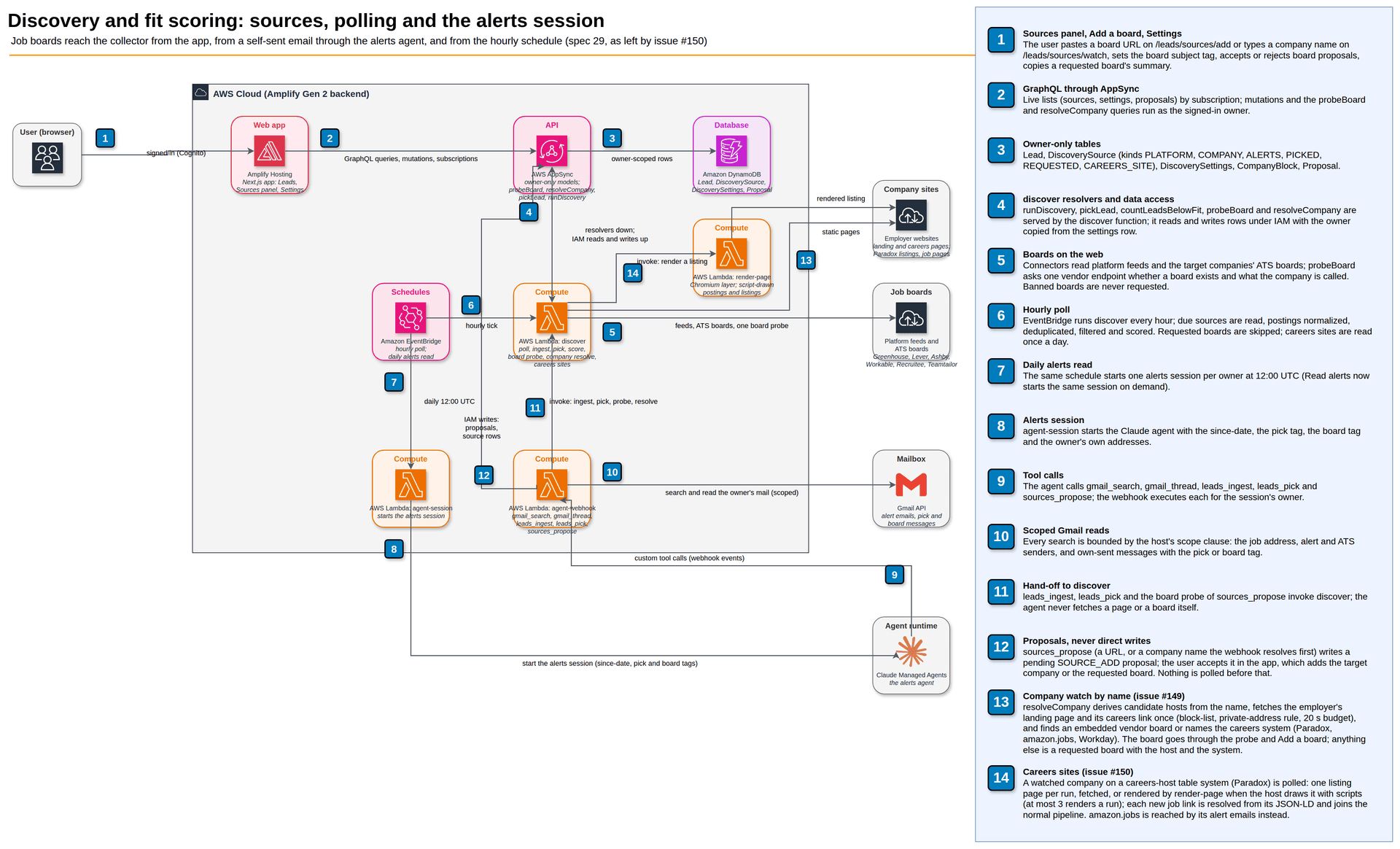
It is also an honest example of the format's limit. The spec has grown through nine issues, and at fourteen steps the lines cross and some labels collide. When an architecture diagram gets this dense, it is telling you the feature should be split, or the diagram should be. C4 has a name for that: zoom in one level.
Process diagrams are Mermaid, inline in design.md. GitHub renders them, they diff line by line in the pull request, and agents write them fluently. Here is a sequence diagram from a fix in my language-learning app. Every create and update in its course admin was failing at the React Server Component boundary, because data-model objects, which carry functions, were being handed from server code to the browser. The diagram makes the boundary the fix depends on impossible to miss:
sequenceDiagram
  participant P as courses/[courseId]/page.tsx
  participant R as reads.ts
  participant A as AppSync

  P->>R: getCourseDetail(courseId)
  R->>A: Practice.get({ id }, selectionSet)
  A-->>R: course
  R->>A: listPracticeLessonsByPractice({ practiceId })
  A-->>R: lessons (ordered, paginated)
  Note over R,A: lesson counts come from the join index,<br/>not from reading Content records
  R-->>P: CourseDetailDTO (plain object)
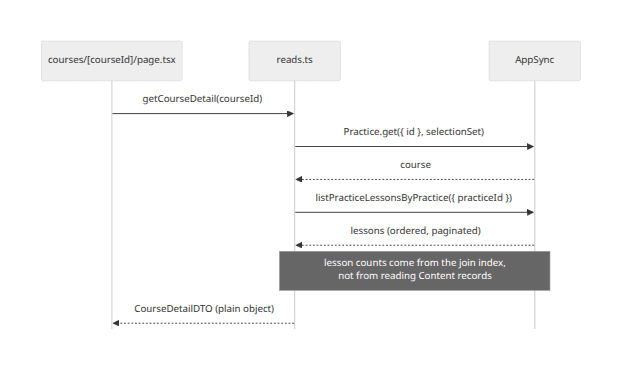
The last line is the whole fix: the page gets a plain object, never a model. The note in the middle is a performance decision that would otherwise live in one reviewer's head. Both are things I would check in a diff only if I already knew to look for them.
And here is the data model of a strategy game, five lines a reviewer reads in ten seconds:
erDiagram
  MATCH ||--|{ SEAT : has
  SEAT }o--|| COUNTRY : plays
  COUNTRY ||--o{ FACT : has
  MATCH ||--o{ EVENTAPPLIED : records
  MATCH ||--o{ MATCHRESULT : produces
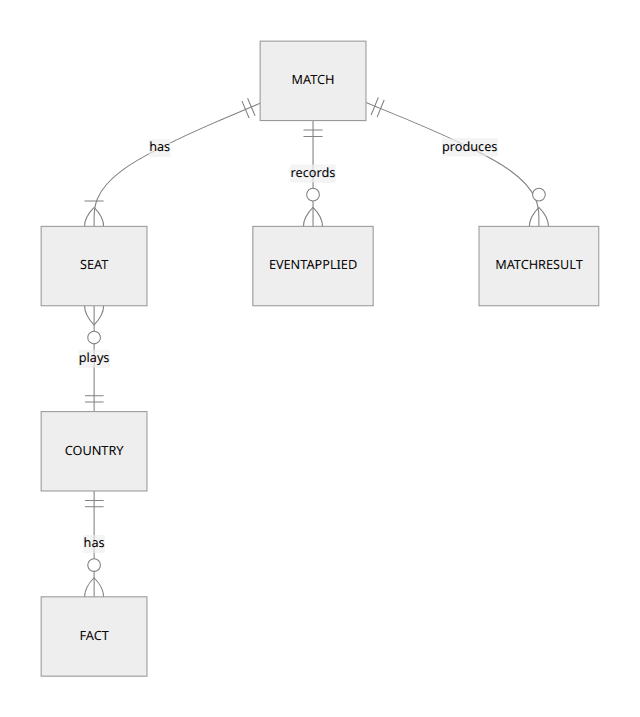
Across seven projects that adds up to about 35 draw.io diagrams and about 100 Mermaid diagrams, mostly flowcharts, sequence diagrams, state machines and ERDs. Agents drew all of them; my part was reviewing them.
Why I rebuilt the AWS diagram skill
My architecture diagrams first came from AWS's aws-diagram-mcp-server, an MCP server that drew diagrams with the Python diagrams package and Graphviz. AWS has since deprecated it in favor of a skill, aws-architecture-diagram, in the deploy-on-aws plugin of awslabs/agent-plugins. The skill is a real improvement: it writes draw.io XML with the official AWS4 icons, in the style of AWS reference architectures, with numbered steps and a legend, and it validates shape names and edges.
The problem was that it did not travel. I use it from Claude Code on my machine, Claude Code on the web, Kiro and Kiro Web, and the plugin only fully works in the first one:
- Validation lives in a Claude Code hook. A skill copied anywhere else carries no hooks, so it writes diagrams nobody validates.
- The Kiro converter drops the hook and the scripts the skill calls, which leaves the skill pointing at files that do not exist.
- Plugins declared in a repository do not install in Claude Code cloud sessions, which read only the repository.
- Kiro CLI users were left without a path. An issue reporting it was opened in April 2026 and closed as "not planned" by a stale bot in October, without a maintainer reply.
So I vendored an adapted copy as a plain agent skill that Kiro and Claude Code both load unchanged:
- The hook became
scripts/check.sh, which runs the same post-processing and validation. - Export became
scripts/export.sh, which installs a pinned draw.io desktop release (checked by SHA-256, no sudo) and renders headless when there is no display. - Two small Python fixes let the validators import on Python older than 3.14.
- The example diagrams were dropped to fit Kiro Web's limit of 25 files per skill.
- Brand icons for non-AWS products (Claude, GitHub, Stripe) are embedded from SVG files in the repository, so the diagram renders anywhere.
One canonical copy lives in my workflow repository, and a setup script installs it for each agent. The two diagrams above that are not Mermaid were made with it.
Where diagrams fail
Diagrams are not a free win. The failure modes I have hit, and the ones the research reports:
- Pretty and empty. An agent will happily draw a diagram that renders, looks professional and explains nothing. Ask for the diagram that answers a specific question ("in what order are these called when the token is expired?"), not "a diagram of the system."
- Stale syntax. Models lag behind Mermaid releases, and so do the renderers in some tools. Validate before you trust a render, and check which diagram types your viewer supports.
- Low recall. A diagram regenerated from code can leave things out, as Code2UML measured. Treat a match as evidence, not proof.
- Diagrams are not the best steering format for every model. The capability-equalizer study found that code-shaped formats like OpenAPI and TypeScript contracts steered weaker models better than diagrams did. My split follows from that: contracts and types to steer the agent, diagrams for the human who approves and reviews.
- Density. Past a dozen boxes, an architecture diagram stops being readable. Split it.
What I am doing next
The skill is general enough to be useful outside my projects, and most of what I changed fixes problems other people have reported. I am going to publish the adapted skill in its own public repository under its Apache-2.0 license, and offer the portability fixes upstream to awslabs/agent-plugins: validation that does not depend on a Claude Code hook, and the Python import fixes. I will update this post when either lands.
The other half is step 5 of the loop: making "regenerate the diagram from the code and diff it" a standard step of the implementation pull request, instead of something I remember to ask for.
References
- Böckeler, B. Understanding Spec-Driven-Development: Kiro, spec-kit, and Tessl. martinfowler.com, October 15, 2025.
- Osmani, A. Comprehension Debt. March 14, 2026.
- Canedo, A. Architecture as Capability Equalizer for Coding Agents. arXiv:2608.21747, August 2026.
- Văduva, A.-G., Andreescu, A.-I., Oprea, S.-V. and Bâra, A. Code2UML: Agentic LLMs with context engineering for scalable software visualization. arXiv:2605.24453, May 2026.
- Szczepanik, K. and Chudziak, J. A. Collaborative LLM Agents for C4 Software Architecture Design Automation. arXiv:2510.22787, HICSS-59, 2026.
- Kiro. Specs. Kiro documentation.
- Cursor. Changelog 2.2. December 10, 2025.
- Google. Antigravity artifacts.
- GitHub Spec Kit. Discussion #694: Embedding Visual Diagrams Across Spec Kit Workflows. October 2025.
- CodeRabbit. Configuration reference.
- awslabs. agent-plugins and mcp issue #2883.
- Brown, S. The C4 model for visualising software architecture.