
Learning AI-DLC building a game, part 3: automated E2E tests
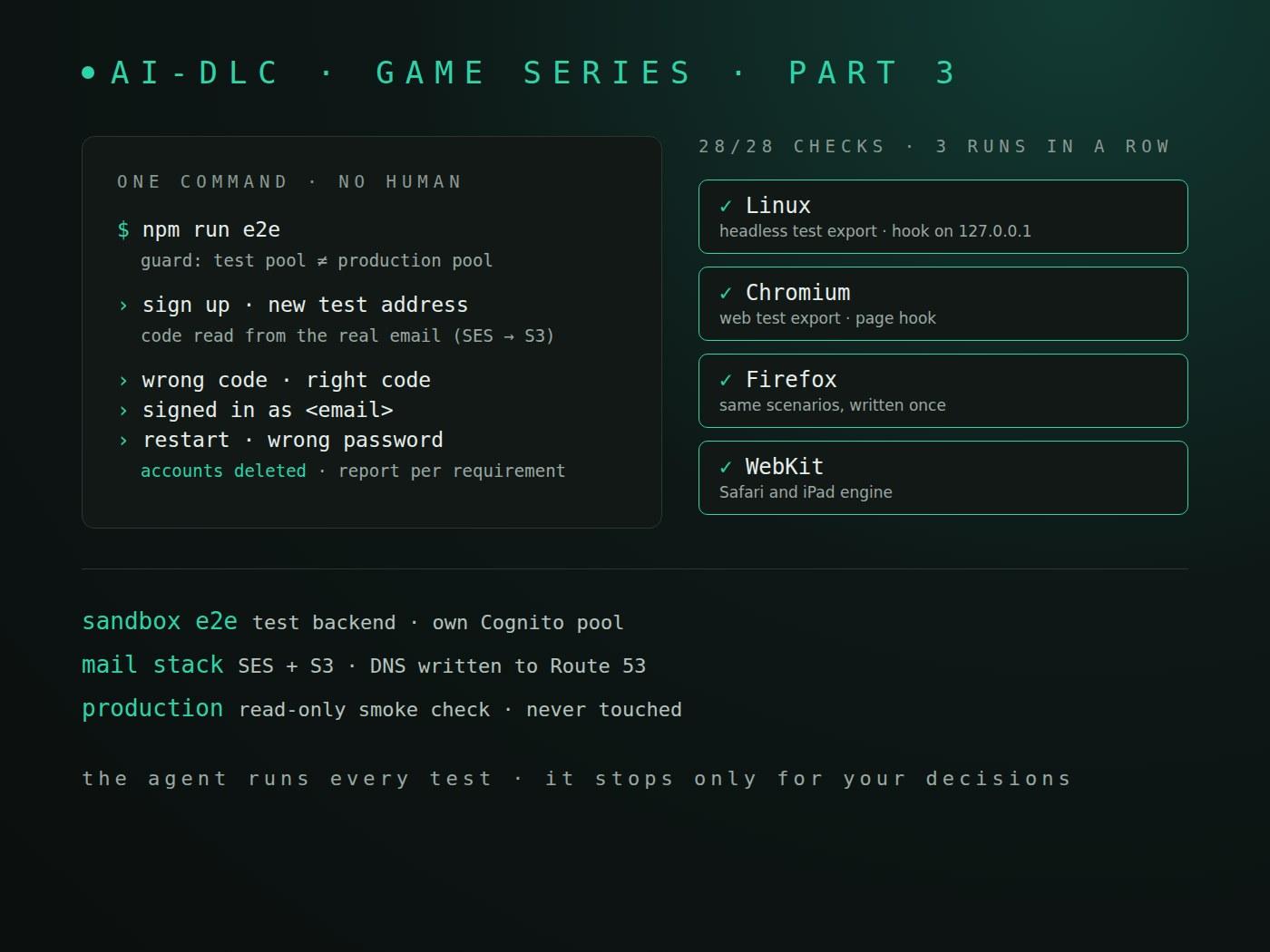
This is part 3 of a series on learning AI-DLC by building a game, World Rift Conflict, in Godot with an AWS backend. Part 2 ended with a sign-in proof of concept that passed, but only because I checked it by hand. This part makes those checks run by themselves.
Parts so far:
- Part 1: setup
- Part 2: a proof of concept
- Part 3: automated E2E tests (this post)
- Part 4: what the reviews caught
- Part 5: inside a stage
TL;DR
- One command,
npm run e2e, now signs a new test player up, reads the confirmation code from a real email, signs in, and tries a wrong code and a wrong password. It runs on a headless Linux build and in Chromium, Firefox and WebKit, against a test backend. - Three full runs in a row passed all 28 requirement and platform checks, in about 0.7 minutes each. The production user pool was never touched.
- AI-DLC tailored a 7-stage plan for this work. Practices and requirements took 18 guided questions, almost all answered with the recommended option. AWS needed two go answers from me.
- A read-only look at the AWS account before the deploy removed my only manual step: the DNS records.
The question
In part 2 the end-to-end check was a runbook: export the Linux build, sign up with an address I could read, copy the code from my inbox, sign in, try a wrong password, then do it all again in Chrome. It worked, and it would not survive the next ten features.
So the next piece of work was automation. When the agent first read it as "automate the sign-in check", I corrected the scope:
it is not for automating the sign in only, it is for automating any e2e test or automation that you can do without my intervention. One thing is to stop at sensible gates and other different to waste time waiting for things that you can do/try yourself
That sentence became the requirement that shaped everything else: the agent runs every test and automation itself, and stops only for decisions that need me.
A plan that fits the work
I started it with /aidlc compose, which proposes a plan for the task instead of using a fixed scope. I asked what each plan type meant before choosing (the agent now has to explain every option, a rule I saved early in this piece of work), then chose "Tailor a plan" and saved it as a reusable scope, godot-e2e-automation.
It kept seven stages: Reverse Engineering, Practices Discovery, Requirements Analysis, Domain Design, Code Generation, Build and Test, and CI Pipeline. It skipped ideation, user stories and units of work, which add little to a test kit built by one developer.
Practices first, then requirements
Reverse Engineering read the repository and wrote nine code-knowledge files. The useful one was the quality assessment: it listed the exact obstacles to automation, with options for each. Cognito emails a code that no script can read. The web build draws everything on one canvas. And every real run needs a backend.
Practices Discovery then asked how this project works from now on. Eight questions, and the answers became standing rules in the team memory:
- A git
pre-pushhook runs the tests before every push. GitHub cannot enforce branch protection on a free private repo, so this is the guard we keep ourselves. - Tests run against a separate test environment, never the production user pool.
- Fast unit and scene tests run inside the Amplify build, so a failing test stops the deploy. The slow end-to-end tests run on my machine, started by the agent.
- Acceptance scenarios come first, then the code, then the unit tests.
- Coverage is measured per requirement and platform, because no GDScript coverage tool exists yet.
Requirements Analysis asked eight more questions. The two that mattered most:
- The emailed code. I chose a real test mailbox over confirming accounts through an admin call. It is the one step every new player goes through, and only a real email would notice if it broke.
- The canvas. I chose a test-only hook built into separate test exports. Player builds never contain it.
I also picked all three browser engines, because WebKit stands in for Safari and the iPad, the one platform I cannot check myself on Linux.
The design
Domain Design came back with 16 building blocks and 8 decisions, each with the options it rejected. Before asking anything, the agent had a research helper check the facts its options depended on:
- Amazon SES receives mail in
us-east-1only for a verified domain, and an account can have only one active set of receiving rules per Region. - gdUnit4 6.2.2 listed Godot 4.7.1 but not yet 4.7.2. GUT supported 4.7 but had no per-test time limit.
- Godot does not deliver simulated key and mouse input in headless mode.
That last fact decided the test hook's shape: it sets field text and emits button signals, the same way the existing scene tests already did, so everything runs without a window.
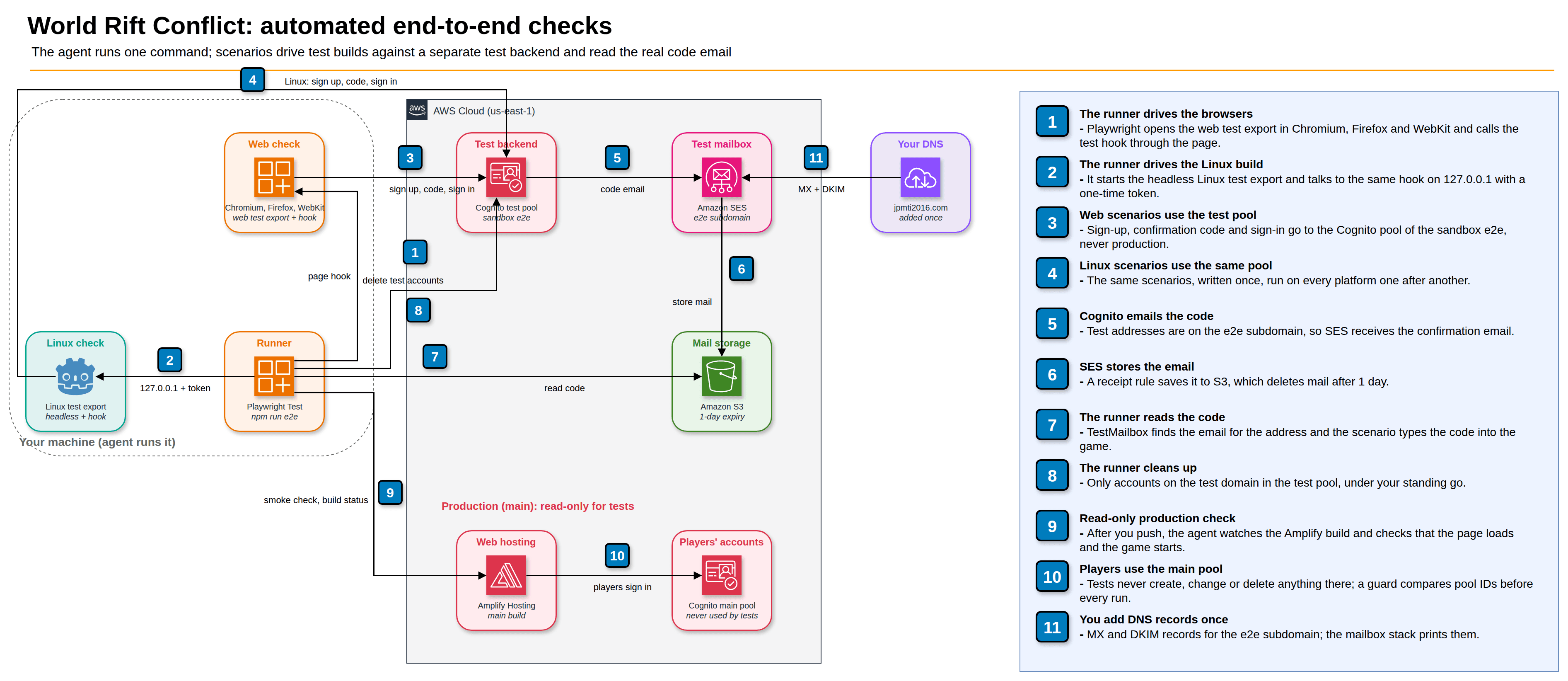
The main decisions:
- Test backend: one long-lived Amplify sandbox named
e2e, deployed from my machine. A second hosted branch would deploy only on push, and pushing is my step, so runs could not happen without me. - Test mailbox: its own small CDK stack. If it lived inside the sandbox, deleting the sandbox would delete the verified domain, and I would have to add DNS records again.
- One runner: Playwright Test runs each scenario on all four platforms. In the browsers it talks to the hook through the page; for Linux it starts the exported game and talks to the same hook over
127.0.0.1with a one-time token. - Production guard: before every run, and again before launching each build, the runner compares the test user pool ID with production's and refuses if they match or if either is missing.
Code generation
The plan had 17 steps and 57 tasks, with the acceptance scenarios first, as the practices said. I approved it, and a developer agent built it locally with no AWS action, as my project rules require. The two stop conditions it carried (gdUnit4 not running on Godot 4.7.2, or gdtoolkit unable to read the code) did not trigger.
The local results:
npm run test:godot   29 test cases | 0 errors | 0 failures
npm run test:unit    tests 89  pass 89  fail 0
npm run test:infra   tests 8   pass 8   fail 0
playwright --list    13 tests (3 scenarios x 4 platforms + production smoke)
One deviation is worth a note. The Linux test build printed nothing to its log until the agent set run/flush_stdout_on_print, and only for builds with the e2e tag, so player builds stay as they were.
Build and test: the AWS part
This is where the "stop only when needed" rule paid off. Before asking for a go, the agent looked at the account read-only and found three facts:
- CDK was already bootstrapped in
us-east-1. - My domain's DNS was a Route 53 hosted zone in the same account. Its main mail goes through ImprovMX, and a new
e2e.subdomain would not touch that. - My sign-in role could not read SES at all (
AccessDeniedonses:DescribeActiveReceiptRuleSet).
So it asked three questions instead of the planned one: a go for the sandbox, a go for the mailbox with the DNS records written into Route 53 by the stack, and whether anything else in the account receives mail through SES. I answered "Go", "Go + DNS in Route 53" and "Not sure".
"Not sure" changed the design on the spot. The stack now turns its receiving rules on through a small custom resource that refuses to replace another active rule set, and turns them off again when the stack is deleted. That removed my manual DNS step and the risk of switching off something I had forgotten about.
Deployment completed in 42.097 seconds          (sandbox e2e)
WorldRiftE2EMail ... Total time: 151.35s         (mail stack)
PASS: the DNS records answer
The first run stopped before any scenario, as designed: "ENVIRONMENT NOT READY: the production outputs file ... is missing". The guard needs the production pool ID to refuse it. With the app ID in a git-ignored settings file, the next runs passed:
| Run | Platforms | Scenarios | Checks (requirement × platform) | Time |
|---|---|---|---|---|
| 1 | Linux | 3 / 3 | all pass | under 1 min |
| 2 | Chromium, Firefox, WebKit | 9 / 9 | 21 / 21 | 0.7 min |
| 3–5 | all four | 12 / 12 each | 28 / 28 each | 0.7–0.8 min |
WebKit, the one engine I could not check by hand, passed every time. Afterwards the test pool had 0 users, the mailbox was empty, and the production pool still showed its last change from the day before.
Two more checks run before anything reaches production. The new step in amplify.yml that runs the Godot tests before the web export was run inside the real build image, from a clean copy, before any push (29 of 29). And the pre-push hook passed all seven of its checks.
The one thing that could not pass
One target could not be checked: the requirement said the test environment costs at most about $5 a month, and that "the first month's bill confirms it". The bill does not exist yet. AI-DLC counts an unverifiable target as a failed check and asked me to accept it or stop. I accepted it as a follow-up for November.
That was my wording, not AI-DLC's fault. I saved a rule so it does not happen again: requirements state pass criteria that can be checked within the work, and anything that needs future data becomes a follow-up.
The numbers
From aidlc engine runtime summary --json:
- 10 stages approved, 0 failed (3 initialization stages plus the 7 in the plan).
- 57 sensor runs, 54 passed.
- 30 stage diary entries, and 10 learnings saved as project rules.
- 179 minutes from the first
/aidlcto the last approval.
What I would tell myself
- Say what "done" means in your own words early. One sentence about not waiting on me shaped the backend, the mailbox and the deploy steps.
- Let the agent look before it asks. A read-only check of the account turned a manual DNS step into a stack resource.
- Pick the browser you cannot test yourself. For me that was WebKit.
- Write pass criteria you can check today.
What is next
The checks run, and they will run again for every new feature: adding a scenario means adding a file. Part 4 looks at the other half of this piece of work: what AI-DLC's reviewers and checks caught before any of this ran.