
Learning AI-DLC building a game, part 1: setup
I am building a game, World Rift Conflict, in Godot with an AWS backend and some AI features. I am also using it to learn AI-DLC, the AI-Driven Development Life Cycle from AWS Labs. AI-DLC is the only process on this project: no GitHub issues, no specs of my own, no Gantt. Whatever AI-DLC asks, I answer; whatever it records, I keep.
This series is the build log, cleaned up. Each part covers one milestone. Part 1 is the setup, up to the first stage of the first piece of work. I compared AI-DLC with other AI workflows in an earlier post; this series is what using it is actually like.
Parts so far:
- Part 1: setup (this post)
- Part 2: a proof of concept
- Part 3: automated E2E tests
- Part 4: what the reviews caught
- Part 5: inside a stage
TL;DR
- AI-DLC installs as a self-contained
aidlcbinary plus a project shell:aidlc config --harness <tool>writes the agents, hooks, skills and rules into the tool's folder (.claude/for Claude Code) and the shared records intoaidlc/. - I installed it for Kiro first, then moved everything to Claude Code. The two installs can live side by side; I only run one.
aidlc updateupdates the binary only. Each project stays on its old release untilaidlc config --harness <tool>refreshes it, once per installed tool./aidlc --doctoris the health check. Its warnings are advisory; the ones I saw were harmless.- The first run was a
poc: four stages, four approval gates. Intent Capture asked six questions, a reviewer agent checked the result, and the notes I kept became project rules.
Three layers
It took me a while to see which parts of the repo belong to whom, so here is the map I ended up with.
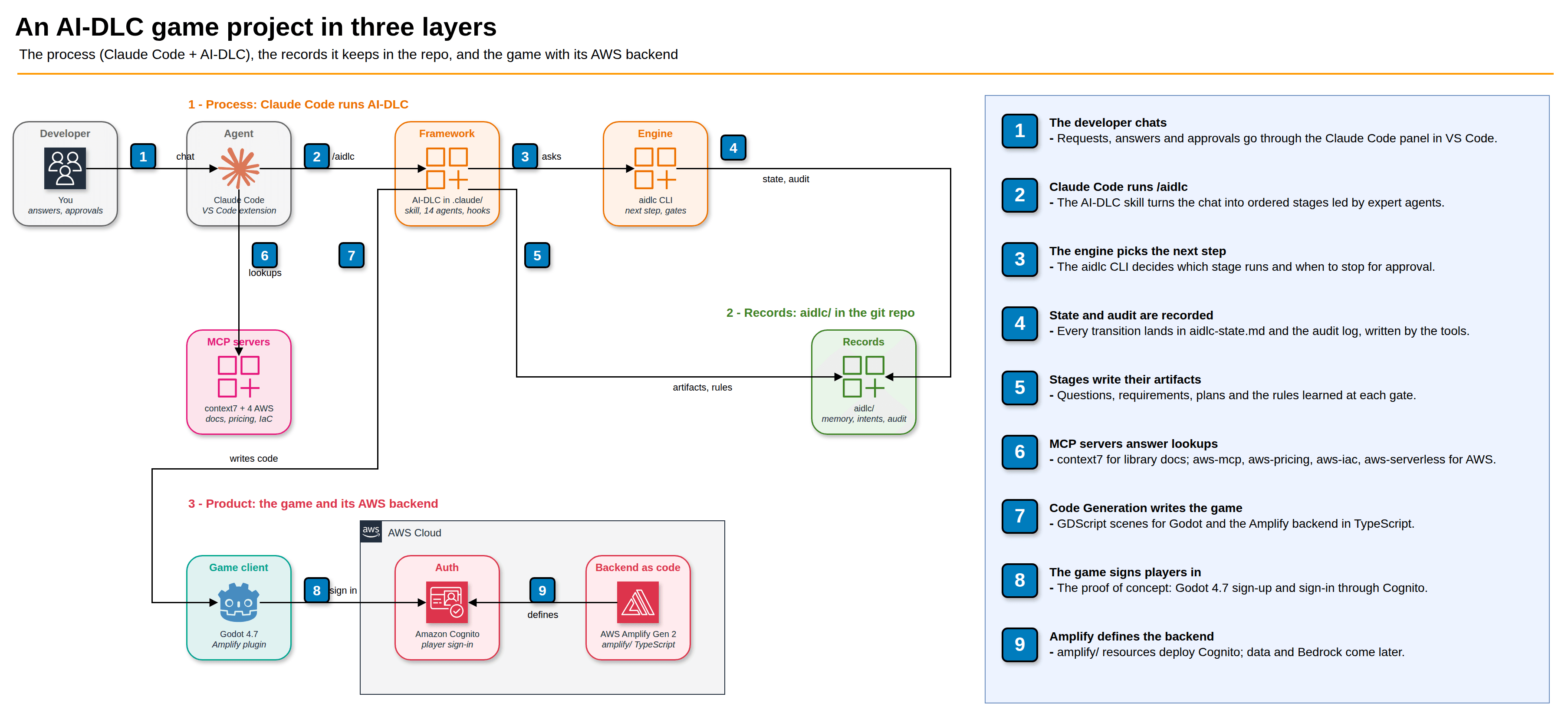
- The process lives in
.claude/: the/aidlcskill (the conductor I chat with), 14 agents (product, architect, developer, quality, two reviewers and so on), hooks that keep the records honest, and sensors that check what each stage writes. Theaidlcengine decides which stage runs next and when to stop for my approval. - The records live in
aidlc/: the method rules (org.md,team.md,project.md), one folder per piece of work (an intent) with its state, questions, artifacts and audit log, and a knowledge catalog for my own documents. All of it is committed to git. - The product is the Godot game and its Amplify backend. For now it is only a plan: the first intent is about signing a player in through Amazon Cognito.
Installing it
The binary was already on my machine. Setting up the project is one command per tool. I started with Kiro, because that is where I was working:
aidlc config --harness kiro-ide --project-dir . --dry-run < /dev/null
# config plan for …/world-rift-conflict: create=335 update=0 merge=0 preserve=0 remove=0 conflict=0
Three hundred and thirty-five files, before a single line of game code. The dry run is worth running every time: it says exactly what it will create, update or remove, and whether anything conflicts with files you already have.
Then I moved to Claude Code. The reason was practical: I have more room there, and I wanted one tool for the whole project. Adding the Claude Code shell next to the Kiro one was the same command with a different harness, plus AI-DLC's default MCP servers:
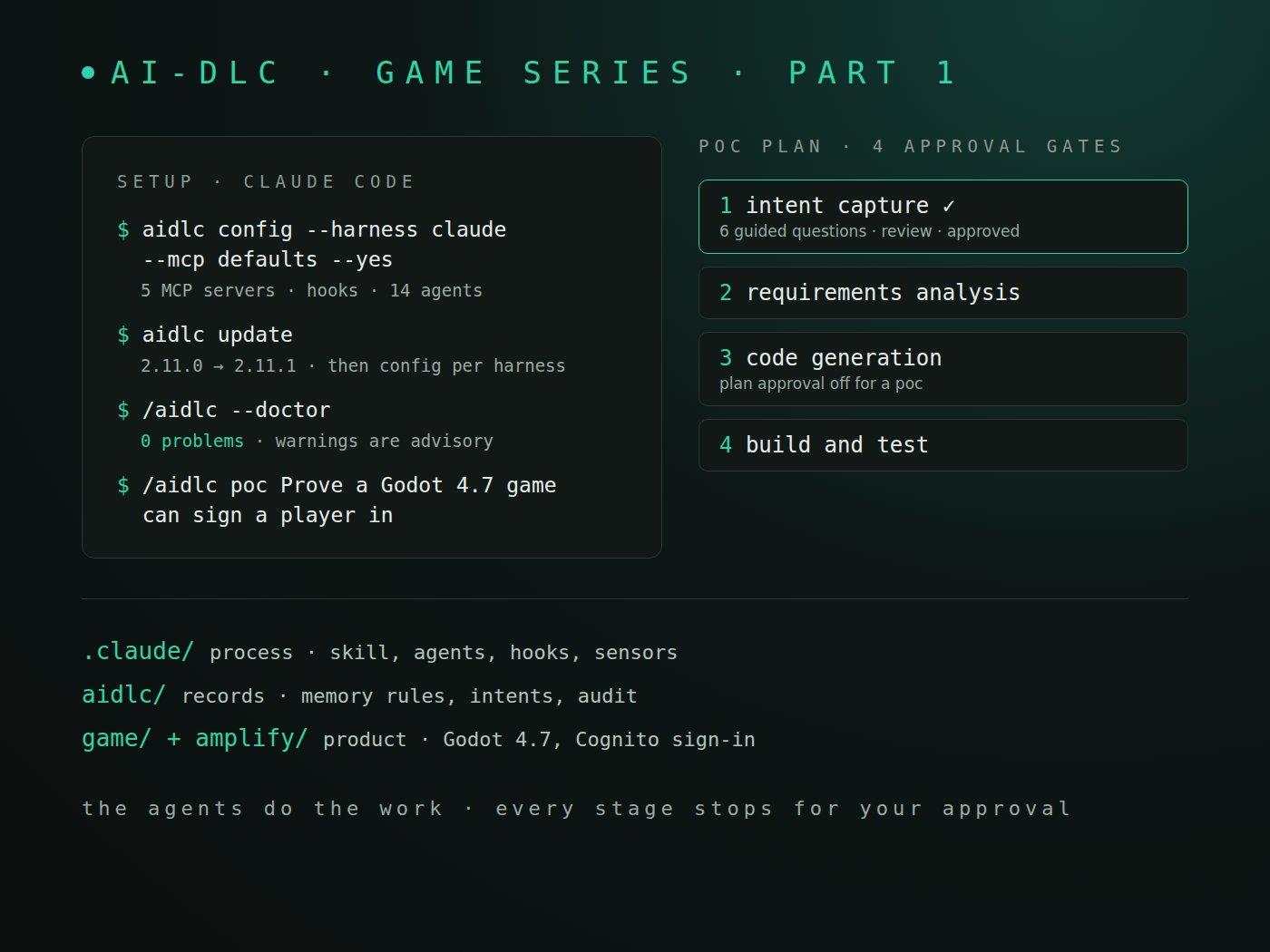
aidlc config --harness claude --project-dir . --mcp defaults --yes < /dev/null
# configured …/world-rift-conflict for Claude Code 2.11.0; next: open Claude Code in this project
# (if it is already open in this folder, exit it and start it again) and run `/aidlc --doctor`
It merged into my existing Claude Code settings and kept my own rules and skills. The five MCP servers are context7 (library docs) and four AWS servers (aws-mcp, aws-pricing, aws-iac, aws-serverless) that use the normal AWS credential chain. Two things tripped me up:
context7readsCONTEXT7_API_KEYfrom the environment Claude Code starts in, not from a project.env. I put it in my shell profile.- The first start of each
uvxserver is slow, because it downloads its Python dependencies.aws-iacshowed "connecting..." until that finished.
Claude Code also has to trust the folder once. Until it does, it ignores the project's allowed commands, and every AI-DLC command turns into a permission prompt.
Rules that fight each other
My usual side projects follow a different workflow, with its own global agent rules: issues, specs, a staging branch, agents never push. Those rules load into every project, including this one. So the project has its own rule files, imported by its CLAUDE.md, that say which global rules do not apply here and let AI-DLC decide instead.
Git was the clearest case. AI-DLC's default is trunk-based development on main: each slice of construction work gets a short-lived branch and is squash-merged into main locally. AI-DLC never pushes. I kept one rule from the old workflow on purpose: pushing to GitHub is my job, and the agent asks me when a push is due. How branches and pull requests should work here is an open question for AI-DLC's Practices Discovery stage, which a poc skips.
The doctor and the update
/aidlc --doctor is the first thing to run, and the first thing to run again when something looks off. My first clean run said:
0 problems, 2 warnings.
Warnings are advisory - if everything works, ignore them.
One warning said a check had failed 63 times because there was no workflow state to read. That is expected before the first intent exists. The other said the update cache was missing, which led to the update:
aidlc update --check
# binary 2.11.0, latest 2.11.1
aidlc update
# Updated aidlc from 2.11.0 to 2.11.1. Project files were not changed. Run 'aidlc config' between workflows to refresh them.
That last line matters. The binary moved to 2.11.1 but the project did not, and the doctor said so: Project runtime stamp: 2.11.0; selected engine: 2.11.1. With two harnesses installed, aidlc config needs to be told which one:
aidlc config --harness claude --dry-run
# config plan for …/world-rift-conflict: create=16 update=195 merge=1 preserve=154 remove=0 conflict=0
aidlc config --harness kiro-ide --dry-run
# config plan for …/world-rift-conflict: create=28 update=198 merge=1 preserve=132 remove=4 conflict=0
I applied both, so the unused Kiro copy would not drift to a different release, then restarted VS Code (Developer: Reload Window). A /clear is not enough: the refreshed files only load on a full restart.
The first run
The first piece of work is deliberately small. Before planning the whole game, I wanted to prove the setup works end to end with the riskiest dependency: the Amplify plugin for Godot was built for Godot 4.3, and I am on 4.7.
/aidlc poc Prove a Godot 4.7 game can sign a player in with the AWS Amplify plugin
AI-DLC created a record folder for this piece of work and proposed the plan: Intent Capture, Requirements Analysis, Code Generation, Build and Test. Four stages, four approval gates.
Intent Capture asked how I wanted to answer its questions (guided, editing the file, or free chat), then asked six: the problem, who benefits, what success looks like, why now, what is out, and who decides. In guided mode each one arrives as a clickable question in the chat, and every answer is written back into a questions file that stays in the repo.
Two moments stood out:
- It asked instead of guessing. Claude Code's picker shows at most four options, so a five-option question came in two halves, and I picked something in both. The next question was a one-line follow-up asking which answer I meant.
- The review did not just say "looks good". A product-lead reviewer agent read the intent statement and returned four findings: "valid session" was never defined, a few assumptions were missing (does sign-up need email confirmation? does the plugin work in a web export?), the problem was wider than the checks, and there was no time limit. Its verdict was still READY, because the review is advisory: the findings go to me at the gate, and approving records them as accepted risks.
Before the gate, AI-DLC showed me its own notes from the stage and asked which to keep. I kept three, and it saved them as project rules. The next stage starts with them loaded.
What I would tell myself on day one
- Decide the process before running any setup script. I ran my old workflow's bootstrap first and had to undo it.
- Read every dry run. The numbers are the best summary of what AI-DLC will do to your repo.
- Treat doctor warnings as questions, not alarms. Both of mine had boring explanations.
- Start with a
poc. It is short enough to learn the loop of questions, review and approval without betting the whole project on it.
What is next
Part 2 finishes the proof of concept: requirements, the code AI-DLC plans and writes (for a poc it starts building without waiting for plan approval), and whether a Godot 4.7 build really signs a player in, in the desktop build and in the browser.