
Tasks you can only finish later, in spec-driven AI work
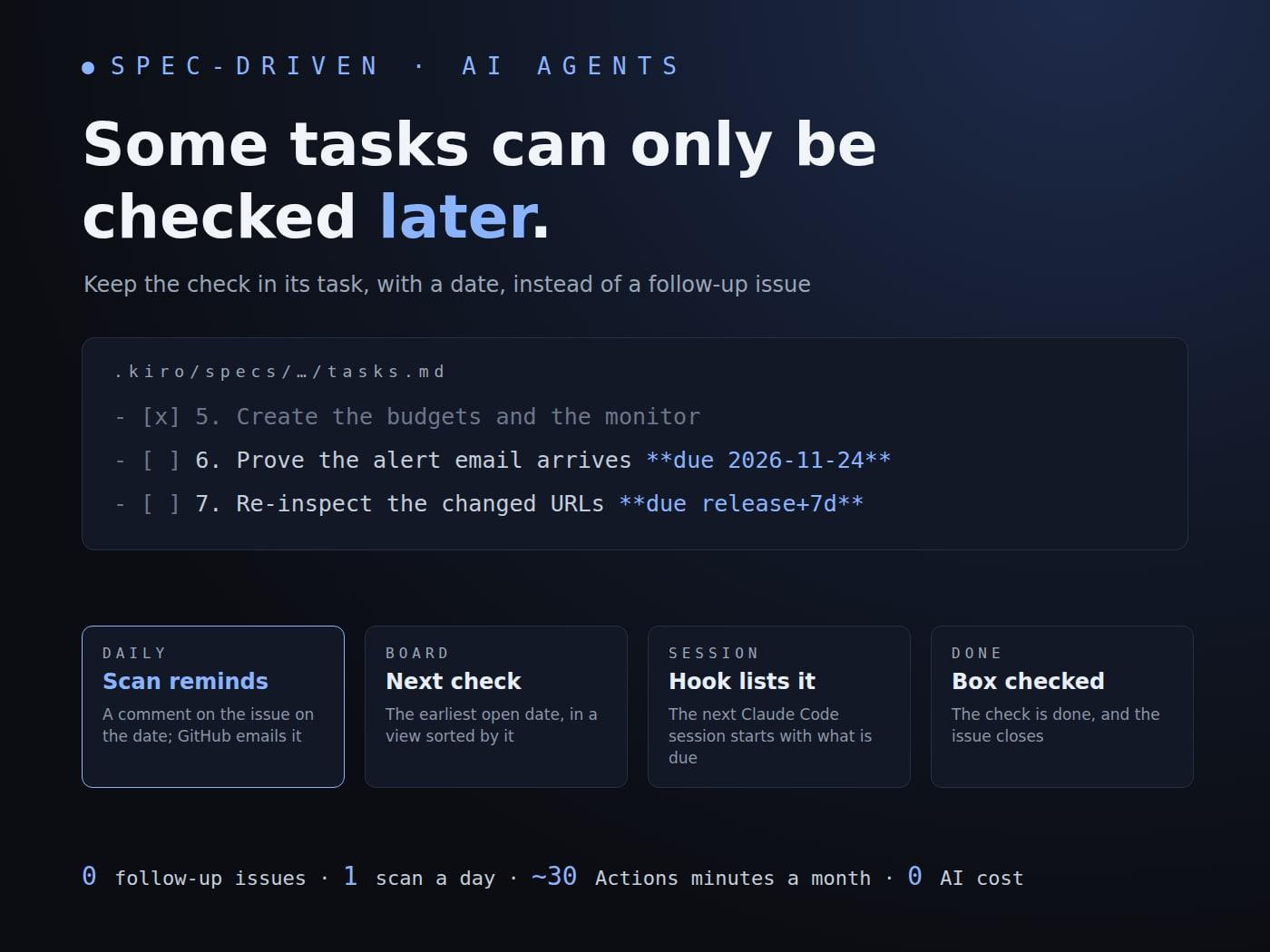
My side projects run on one loop: a GitHub issue becomes a spec, the spec's tasks.md becomes a list of checkboxes, an AI agent works through them, and a workflow closes the issue when every box is checked. I described that pipeline in how I track AI coding work across projects.
The loop has a gap. Some tasks cannot be finished in the session that does the work, because the proof only exists later:
- "Confirm the budget alert email arrives" can only be checked after AWS refreshes its budget data, up to a day later.
- "Re-inspect the changed URLs in Search Console" means waiting about a week for Google.
- "Read a week of field Core Web Vitals" needs a week of visitors.
This post is about where those checks should live and what reminds me to do them.
TL;DR
- A check that needs time stays in its own task, with a due date:
**due 2026-11-25**, or**due release+7d**until the release happens. No follow-up issue. - A scheduled GitHub Actions job scans every repo's tasks once a day. When a task falls due, it comments on the issue, so GitHub emails me, and it sets a "Next check" date in the project board.
- A
SessionStarthook in Claude Code lists the due tasks of the repo I open, so the agent knows about them before I type anything. - Claude Code's cloud scheduled tasks can do some of the checks themselves, but not the ones that need my local AWS login, and they are a research preview. I use them for a few checks, not as the reminder system.
What went wrong with follow-up issues
My first answer was a new issue for every later check. A search across my repos found the result:
- A portfolio issue that says "confirm Google picks up the /es canonical" has been open since October 14, with no date on it. Nothing ever said when to look.
- Three issues opened the same week say "re-inspect the URLs", "check whether field LCP stays above 2.5 s" and "update the post with a week of data". Each repeats context that already lived in the spec that created it.
- When the follow-up and its source both stay open, the project board shows two items for one piece of work. When the source closes first, the board says the feature is done before it has been proven.
The deeper problem is that an issue is the wrong shape for "do this on a date". It has no due date, and nothing about it changes when the day comes.
The rule: the check stays in its task, with a date
The check belongs to the task that needs it, written as a normal checkbox with a due date:
- [ ] 6. Prove delivery, then delete the old budget (Req 3.7, 4) **owner** **due 2026-11-24**
- [ ] 7. Check billing by tag (Req 11.2) **due 2026-11-25**
Often the date is not known when the spec is written: "a week after release" depends on when the release happens. So the marker has a second form, **due release+7d**, with a few fixed anchors: release, deploy, merge, or task6 for another task being checked off. Whoever makes the anchor happen writes the real date in the same pull request. If they forget, the marker on a checked task anchor is flagged as a missing date.
This keeps one source of truth. The issue stays open and "In Progress" until the check is done, which is accurate. The status workflow already closes an issue only when every box in its section is checked, so nothing about status changes.
A follow-up issue is still right in one case: when the check finds new work, such as a fix in another repo. Then the check's task links the new issue and gets checked off.
What reminds me
I compared every way Claude Code can run something later. Each one has a different weak spot:
| Option | Runs when | Can use my laptop's AWS login | Weak spot |
|---|---|---|---|
Cloud scheduled tasks (/schedule) | At a set time, laptop off | No: a fresh clone of the repo and the claude.ai connectors | Research preview; at most hourly; no documented notification of the result |
| Desktop scheduled tasks | While the desktop app is open and the computer awake | Yes | A closed laptop means a missed run, with one catch-up later |
/loop and session timers | While that session is open | Yes | Gone when the session closes; recurring tasks expire after 7 days |
SessionStart hook | Each time a session starts | Reads local files | Only fires when I open a session |
| Scheduled GitHub Actions workflow | Every day, nothing of mine running | No | Can remind, not check |
No single option both runs on its own and can use my local credentials, so I use three together.
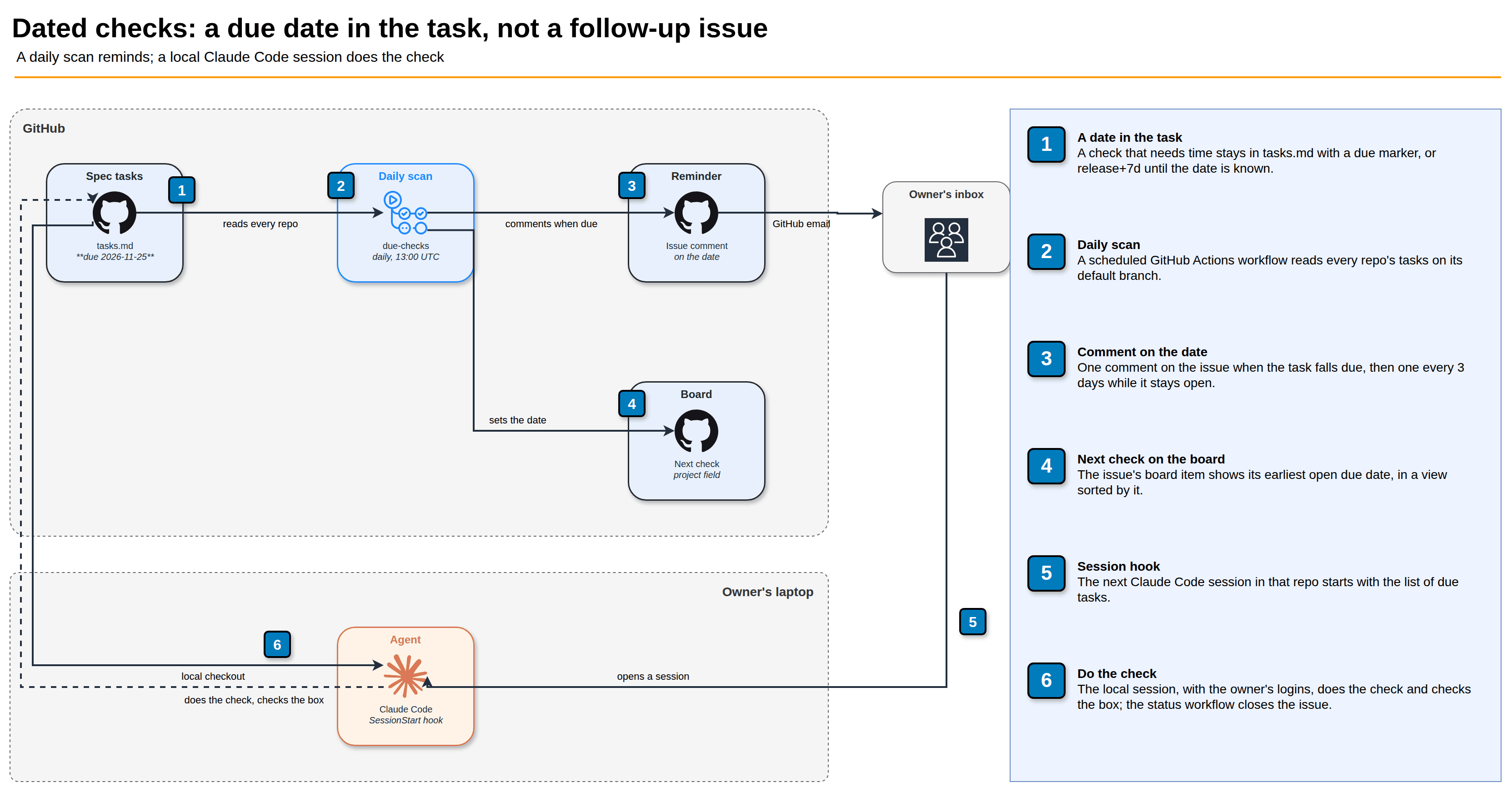
The daily scan is the backbone. One scheduled workflow in my workflow repo reads every project's tasks.md on its integration branch once a day. For each unchecked task whose due date has come, it comments once on the task's issue ("Task 7 — Check billing by tag: due today") and, while the task stays unchecked, once more every three days. It also keeps a "Next check" date on the issue's item in the project board, set to the earliest open dated task. Each comment carries a hidden key, so a reminder is never posted twice and the scan needs no database. The comment is what reaches me: GitHub emails it. The board gets a "Due checks" view sorted by that date. It costs no AI usage, and about 30 Actions minutes a month, against the 2,000 free minutes of a private repo.
It reuses the token my status automation already has, a classic token with the repo and project scopes. One detail is worth guarding: with a token that has only project, GitHub's "list my repositories" call quietly returns only the public ones, so the scan would run green every day while skipping every private repo. It reads the token's scopes before anything else and stops if either is missing.
The session hook puts the due list in front of the agent. A SessionStart hook reads the current repo's tasks.md and prints the tasks that are due. Its output is added to the session's context, so when I open Claude Code in that repo, the agent starts with "Task 7 of #39 has been due since November 25". Because the session runs on my machine, the agent can then do the checks that need my AWS login.
Cloud scheduled tasks do the checks that need nothing local. "Did the alert email arrive?" needs only Gmail, and "did the new URLs get indexed?" only the web. For those, /schedule in 1 day, ... can do the check, check the box on a branch, and open the pull request. I keep them for single checks, because they are a research preview and their limits may change.
It went live on November 23. The first run read the 11 repositories that have specs, found no dates yet, and wrote nothing, which is the right answer for a day with no markers. The first real reminder is the one that started this post: the budget email check, due November 24. I will add what two weeks of reminders looked like to this post.
What changes in the agents' instructions
A rule in my shared AGENTS.md, which every agent reads, in short:
A task that needs time stays in its spec. Write it as a normal task with
**due YYYY-MM-DD**, and do not open a follow-up issue for it. Open a new issue only when the check finds new work.Leave due tasks for their date. Finish the tasks that can be done now, open the pull request with
Refs #n, and say which tasks wait and until when. The pull request that checks the last due task closes the issue.
Four skills carry it out:
- the spec skill writes the due marker when it plans a check;
- the implementation skill writes the real date when it makes an anchor happen, and leaves a task alone until its date;
- the issue skill proposes a due marker on the right task instead of a new issue for "re-inspect…" or "confirm…";
- the SEO skill writes its "inspect again a week after the deploy" step as a dated task.
What I did not do
- A reminder per task in my calendar. It works, but the date would live outside the spec, and moving it means editing two places.
- Only cloud scheduled tasks. They cannot reach the AWS login on my laptop, and I do not want long-lived AWS keys in a cloud environment.
- A cron job on my laptop running
claude -p. It would work while the laptop is awake, but an unattended agent with my credentials and pre-approved permissions is more than a reminder needs.
The point of the change is small: a check that needs time is still part of the work, so it belongs in the same task list as the work, with the date written down.