
Which Node.js builds your Amplify app? The log won't say
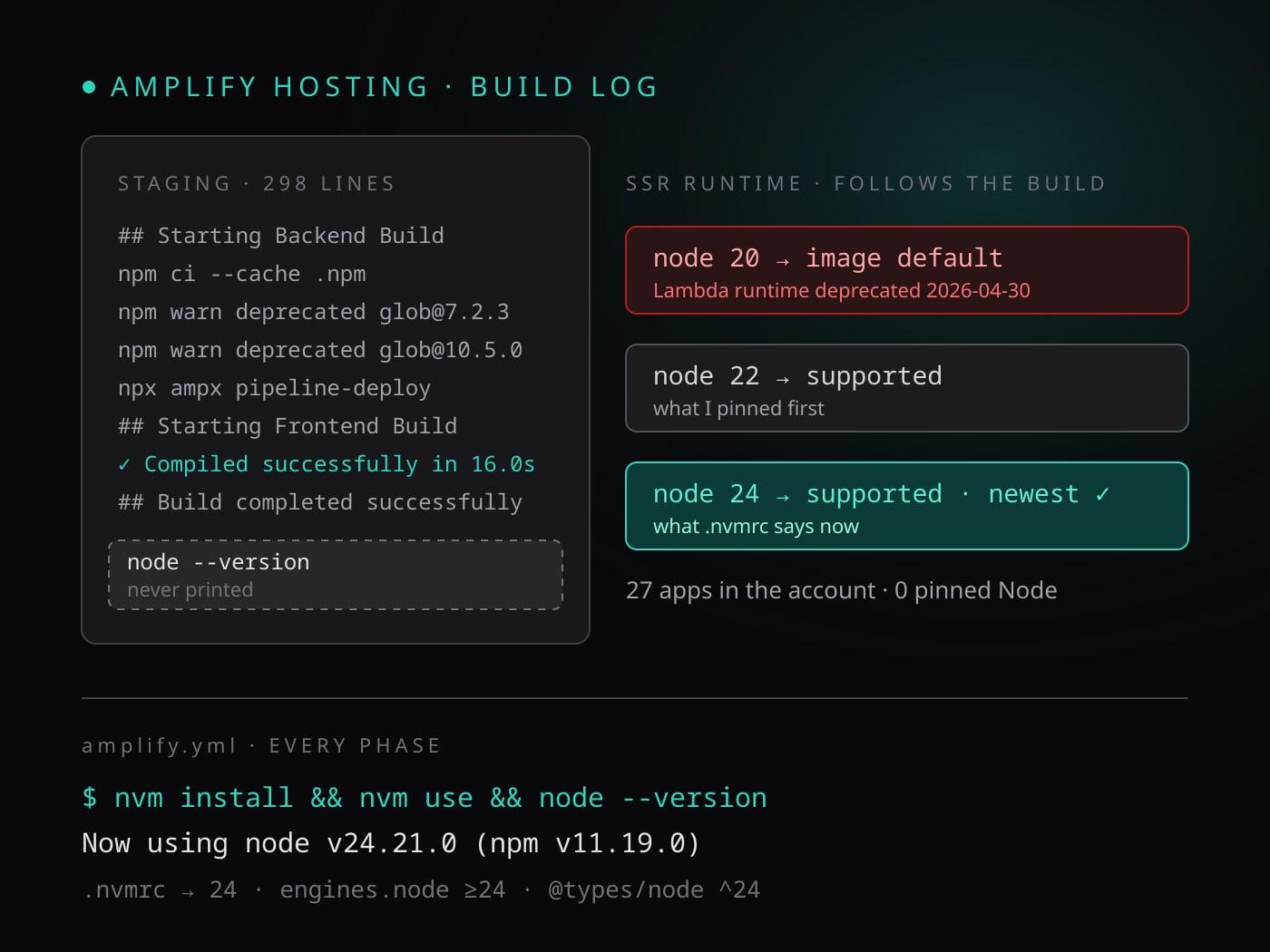
I was closing out a repository-hygiene issue on a small Next.js 16 app with an Amplify Gen 2 backend. One task read: declare engines.node to match the Node major the project is built with, and check that the Amplify build image satisfies it. Easy. Open the latest staging build log, find the Node version line, write the number down.
There is no Node version line. The log is 298 lines long: cloning, cache, npm ci, a column of npm warn deprecated, ampx pipeline-deploy, next build, done. Not one of them says which Node ran any of it. I had been deploying to Amplify Hosting for a year without knowing.
TL;DR
- Amplify Hosting's default Amazon Linux 2023 build image ships Node 18 and 20 and uses one of them unless you say otherwise. The build log does not print which.
- For a Next.js compute app, the SSR runtime is whatever Node major built the app. The silent default decides your production runtime, and Lambda deprecated its
nodejs20.xruntime on April 30, 2026. - Amplify Hosting currently lists Node 20, 22 and 24 as supported SSR runtimes. Pin the newest one in
.nvmrc, and letamplify.ymlrunnvm install && nvm use && node --versionbefore every phase. - Keep
engines.nodeas a floor and@types/nodeon the same major, and move all three up together when Amplify lists a newer one. - Prefer
nvmin the repo over the console's Live package updates. The version belongs in version control, andlatestfails the build anyway.
What the log does say, and what it doesn't
A build log tells you a lot by accident. Mine showed npm warn deprecated glob@7.2.3, glob@10.5.0, glob@11.1.0: three generations of one package, none of them Node. It showed npm ci finishing, Turbopack compiling in 16 seconds, static pages prerendering. It did not show node -v, because nothing in the default build runs it and Amplify's runner does not announce the runtime it hands you.
So the number had to come from documentation instead. Three facts, from three different AWS pages:
- When Amplify moved its default build image to Amazon Linux 2023 in 2024, the announcement said Node 18 and 20 come pre-installed, with
nvmavailable for anything newer. - The SSR feature page says that when Amplify builds and deploys a Next.js compute app, it uses the Node.js runtime version that matches the major version of Node.js that was used to build the app. If you don't specify one, Amplify defaults to the version the build container is using.
- The same page lists the runtimes Hosting still supports: Node 20, 22 and 24. Node 14, 16 and 18 are gone.
Put together: my app was almost certainly being built on Node 20, because Next.js 16 refuses anything older than 20.9, and the image offers nothing newer by default. That made the production SSR function a nodejs20.x Lambda, on a runtime Lambda itself had deprecated six months earlier. Nothing was broken. Nothing would have told me when it broke.
Twenty-seven apps, zero pins
Before changing the app I checked how the rest of my projects handled this, since they all run the same stack. The Amplify API lists every app in the account with its build spec and environment variables, which is where the console's Live package updates land as a _LIVE_UPDATES JSON string.
Twenty-seven apps. Not one pinned Node, in the build spec or in Live package updates. A few older ones had _CUSTOM_IMAGE set to the Amazon Linux 2 image, which is its own problem. Every Next.js 16 app in the family, including the two I write about most on this site, was building on whatever the image chose. The hygiene task I had picked up for one app was a family-wide gap.
Two ways to pin, one of them in the repo
Amplify gives you two mechanisms. The console has Live package updates, where you pick a package, such as Node.js, and a version; the build runner installs it before your commands run. The documentation warns that choosing latest for Node fails the build, so you set an exact major. It works, and it lives outside the repository, in a setting nobody diffs.
The other mechanism is the one every Linux developer already knows. The build image ships nvm, so a line in amplify.yml can install any version you name. That is the one I used, with one refinement: the file names no version at all.
version: 1
backend:
  phases:
    build:
      commands:
        # Pin Node to .nvmrc: the default image ships Node 18/20 and the
        # SSR runtime follows whichever major built the app.
        - nvm install && nvm use && node --version
        - npm ci --cache .npm --prefer-offline
        - npx ampx pipeline-deploy --branch $AWS_BRANCH --app-id $AWS_APP_ID
frontend:
  phases:
    preBuild:
      commands:
        - nvm install && nvm use && node --version
        - npm ci --cache .npm --prefer-offline
    build:
      commands:
        - nvm use
        - npm run build
nvm install with no argument reads .nvmrc, and .nvmrc holds one line:
24
Three details are deliberate:
node --versionin the command. The next person who opens a build log gets the answer I didn't have. The line now readsNow using node v24.21.0 (npm v11.19.0), followed byv24.21.0, in both the backend and the frontend phase.nvm useagain in the frontendbuildphase. Amplify runs the phases in one shell, so thepreBuildselection carries over, but a one-second command that makes the phase self-describing is cheaper than finding out otherwise.- The version appears in exactly one file.
package.jsonsays"engines": { "node": ">=24" }, a floor rather than a pin, because my machine runs Node 26 and the floor is whatnpmcan enforce.@types/nodeis^24so the types describe the runtime. When Amplify lists Node 26, all three move together and nothing else changes.
The first build after the change downloaded Node 24.21.0 in about three seconds per phase, compiled, deployed, and the SSR function now runs on nodejs24.x. The deployed app did not change by a byte of application code.
Why 24 and not 22
My first version of this fix pinned 22. It was the version I had in my head as "current", the documentation search I ran only asked whether the image default was below 22, and the Amplify Gen 2 tooling's own prerequisite reads >=22. All true, and all a little behind.
The rule I ended up writing into the shared engineering steering for every project is simpler than a number: pin the newest major Amplify Hosting lists as a supported SSR runtime, and move when the list moves. Today that is 24. A pin at 22 would have been correct for exactly as long as it took someone to read the supported-runtimes page properly, which is the kind of correctness that quietly expires.
A note on doing this with an AI agent
An AI coding agent did the implementation, and it made the mistake above: it read the build log, found no Node line, searched the docs, concluded the image default was below 22, and added nvm install 22 && nvm use 22 to the build spec. Reasonable, cited, and narrower than the question deserved.
What caught it was a one-line question from me: did you check the docs through the Amplify skill, and how do we do this in the other projects? The honest answer was no and no. The second pass is where the twenty-seven-app listing, the supported-runtimes list and the "newest supported" rule came from, and where the hard-coded 22 became a bare nvm install reading .nvmrc.
The lesson for the agent went into its memory: before any Amplify, Node or test-harness decision, invoke the Amplify skill and compare with the sibling projects, then present the options. The lesson for me is that "how do the other projects do it?" is the cheapest review question I own.
Rules that generalize
- A silent default is a decision someone else made for you. If a platform picks a runtime, find out which one and write it down where a diff can see it.
- Make the build log answer the question. One
node --versionline costs nothing and ends the archaeology. - One file owns the version.
.nvmrcis read bynvm, by most editors, and by people. Everything else derives from it or states a floor. - Pin to the platform's supported list, not to a number you remember. Supported lists move; remembered numbers don't.
- Check the whole family before fixing one member. The gap I found in one app was in all twenty-seven.