
Every Amplify branch needs its own Stripe webhook
I was closing out a referral program for Back to Fluency, my language-learning app. The feature hangs off three Stripe events the app had never listened to before: invoice.paid to earn a reward, and charge.dispute.created / charge.dispute.closed to void or reinstate it. Code done, tests green, end-to-end run against the sandbox green. One line was left in the pull request's to-do list: register the three new events on the hosting branches.
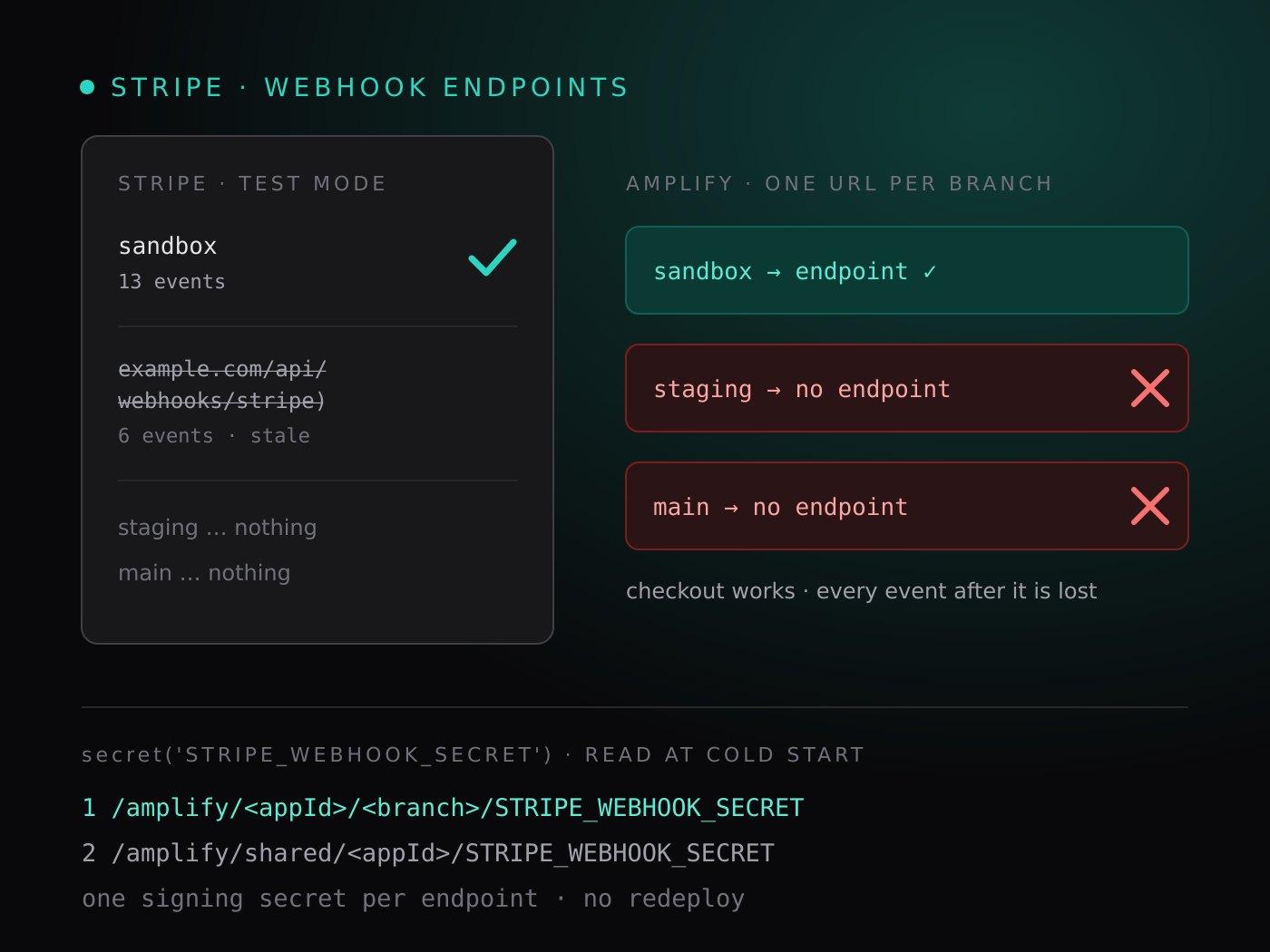
That line took longer than the feature's last three tasks combined, because when I went to add three events to the staging and production endpoints, there were no endpoints to add them to. Neither hosted branch had ever received a Stripe webhook. Nothing had failed, so nothing had told me.
TL;DR
- In Amplify Gen 2 a webhook handler is best deployed as a Lambda with a Function URL. Every branch deploys its own copy, so every branch has its own URL, and Stripe needs one endpoint per branch, each with its own signing secret.
- The sandbox's URL lands in your local
amplify_outputs.json, so the sandbox gets wired up. The hosted branches' URLs land in CloudFormation outputs nobody reads, so they don't. - A missing endpoint is silent. Checkout works, because that's the app calling Stripe. Every event Stripe sends back afterwards has nowhere to go.
- A
secret()is read from SSM at cold start, branch path first, then the app-wide shared path. A branch-level value overrides the shared one and needs no redeploy. - The signing secret exists only in the response that creates the endpoint. Write it straight into SSM from the same process; never paste it.
Why the webhook is a Lambda and not a route handler
The obvious place for a Stripe webhook in a Next.js app is app/api/webhooks/stripe/route.ts. The app started there, and that route is still in the repo, deprecated. It can verify the signature fine. What it can't do is write. The data layer is an Amplify Gen 2 schema with authorization rules, and a route handler running in Amplify's SSR compute has no identity the schema authorizes for system writes: it is not a signed-in user, and it is not a backend resource.
A function defined in amplify/ is. Granting it allow.resource(stripeEventProcessor) in the schema is the sanctioned way to let a system process update any user's subscription and credit ledger. Stripe still needs an HTTPS URL to call, so the function gets a Function URL:
// amplify/backend.ts
// Safe without URL auth: the handler verifies every request's
// Stripe signature before acting.
const stripeWebhookUrl =
  backend.stripeEventProcessor.resources.lambda.addFunctionUrl({
    authType: FunctionUrlAuthType.NONE,
  })

backend.addOutput({
  custom: { stripeWebhookUrl: stripeWebhookUrl.url },
})
// amplify/functions/stripe-event-processor/resource.ts
export const stripeEventProcessor = defineFunction({
  name: 'stripe-event-processor',
  entry: './handler.ts',
  timeoutSeconds: 30,
  resourceGroupName: 'data',
  environment: {
    STRIPE_SECRET_KEY: secret('STRIPE_SECRET_KEY'),
    STRIPE_WEBHOOK_SECRET: secret('STRIPE_WEBHOOK_SECRET'),
  },
})
That is the whole design, and it is correct. The trouble is what addOutput implies.
One URL per branch, and only one of them is visible
addOutput writes the URL into amplify_outputs.json. For the sandbox, that file is on your disk, and it's the file you open when the setup guide says "copy custom.stripeWebhookUrl and paste it into the Stripe dashboard." So the sandbox endpoint got created on day one and kept up to date.
Each hosted branch is a separate deployment with its own Lambda and its own Function URL. Its amplify_outputs.json is generated during the Amplify build and never leaves it. Nothing on your machine shows you the staging URL or the production URL, so nothing reminds you to register them.
There is a second trap in the same place. The URL belongs to the Lambda, and the Lambda can be replaced. Not long ago I moved the processor into the data resource group to break a CloudFormation dependency cycle. CloudFormation replaced the function, and the Function URL changed. Any endpoint pointing at the old URL would have started failing quietly. The comment in resource.ts now says so, because the next refactor will do it again.
What was actually in Stripe
Listing the test-mode webhook endpoints gave me two lines where I expected at least three:
we_…  enabled  https://<sandbox-id>.lambda-url.us-east-1.on.aws/    13 events
we_…  enabled  https://example.com/api/webhooks/stripe)             6 events
The first was the sandbox. The second was a placeholder from the deprecated route's era. Look at the closing parenthesis inside the URL: it was pasted out of a Markdown link and never worked. Staging and production had nothing.
The hosted branches read their Stripe key from an app-wide shared secret. Before changing anything I wanted to be sure that key was the same one in my local .env, without printing either. Hashing both values and comparing the hashes answered it. Same key, so the endpoints I was looking at were the only ones that existed.
Finding a branch's Function URL without Lambda permissions
My day-to-day AWS role can't call lambda:GetFunctionUrlConfig, which is the obvious way to look a URL up. It didn't need to. The root CloudFormation stack of every Amplify branch carries the same custom outputs the build writes into amplify_outputs.json, as a JSON string in an output named customOutputs:
# The branch's root stack (the one without a parent)
aws cloudformation list-stacks \
  --stack-status-filter CREATE_COMPLETE UPDATE_COMPLETE \
  --query "StackSummaries[?starts_with(StackName, 'amplify-<appId>-staging-branch-') && !ParentId].StackName" \
  --output text

# Its custom outputs, as amplify_outputs.json would have them
aws cloudformation describe-stacks --stack-name amplify-<appId>-staging-branch-<hash> \
  --query "Stacks[0].Outputs[?OutputKey=='customOutputs'].OutputValue" --output text \
  | jq -r '.custom.stripeWebhookUrl'
The Amplify Console shows it too: the branch, then Deployed backend resources, then the function. The CLI version is the one a script can use.
Where secret() actually comes from
The setup guide I had written for this project said Amplify secrets are resolved at deploy time, so you redeploy after changing one. That's wrong, and the difference matters here.
A secret('NAME') doesn't put the value in the Lambda's configuration. It sets a placeholder and an AMPLIFY_SSM_ENV_CONFIG variable listing two SSM paths per secret. A shim that runs before your handler, once per cold start, reads them:
1. /amplify/<appId>/<branch>/STRIPE_WEBHOOK_SECRET   ← branch value, if it exists
2. /amplify/shared/<appId>/STRIPE_WEBHOOK_SECRET     ← fallback for every branch
Three consequences:
- A branch-level parameter overrides the shared one. You can fix one branch without touching the others.
- No redeploy is needed. The next cold start picks the new value up. A warm container keeps the old one until Lambda recycles it, which matters if you rotate a secret on a live endpoint.
- A shared webhook secret is wrong by construction. Sharing the Stripe key across branches is fine. But each endpoint has its own signing secret, so a single shared
STRIPE_WEBHOOK_SECRETcan only ever verify one branch's events. The app had exactly that, set months earlier, matching no endpoint that could ever reach the app.
The fix: a script that can create, and never shows the secret
The repo already had scripts/stripe-webhook-events.ts. It held the list of events the processor handles, found the sandbox endpoint by the URL in amplify_outputs.json, and added any missing events. Updating an endpoint keeps its signing secret, so that part was safe to run any time.
I gave it three options:
--url <function-url>targets a hosted branch's endpoint instead of the sandbox's.--createcreates the endpoint, with every event, when no endpoint has that URL.--secret-ssm <name>stores the new endpoint's signing secret in that SSM parameter.
The last one exists because of a Stripe detail: the signing secret is returned only in the response that creates the endpoint. Every later read omits it. The usual workflow, create in the dashboard, reveal, copy, paste into a secret store, routes a production credential through your clipboard and your terminal history. The script writes it straight from the create response into SSM:
async function createEndpoint(stripe: Stripe, url: string, secretSsmPath: string | null, dryRun: boolean) {
  const ssm = secretSsmPath ? new SSMClient({}) : null
  if (ssm) {
    // Fail before creating anything when the AWS credentials are missing or expired.
    await ssm.send(new DescribeParametersCommand({ ParameterFilters: [{ Key: 'Name', Values: [secretSsmPath!] }] }))
  }
  if (dryRun) return
  const created = await stripe.webhookEndpoints.create({
    url,
    enabled_events: [...PROCESSOR_EVENTS],
    description: 'back-to-fluency-ai stripe-event-processor',
  })
  if (!ssm || !secretSsmPath) return
  if (!created.secret) throw new Error(`${created.id} was created without a signing secret in the response`)
  await ssm.send(new PutParameterCommand({ Name: secretSsmPath, Value: created.secret, Type: 'SecureString', Overwrite: true }))
}
The credentials check before create is the detail I'd most want someone to copy. If the AWS session had expired between creating the endpoint and storing its secret, I'd have an endpoint whose secret existed nowhere. Fixing that means rolling the secret in the dashboard, which is the clipboard workflow the script was written to avoid.
Two smaller guards: the script refuses a live-mode key unless --live is passed, and --dry-run reports what it would do without doing it. The dry run against the staging URL was also how I confirmed the local AWS session worked before anything real happened.
One command per branch:
npx tsx --env-file=.env scripts/stripe-webhook-events.ts \
  --url https://<staging-id>.lambda-url.us-east-1.on.aws/ \
  --create --secret-ssm /amplify/<appId>/staging/STRIPE_WEBHOOK_SECRET
Then the same script with --dry-run against each URL, as the check:
we_…  (enabled) subscribes to 13 events; missing 0: —
we_…  (enabled) subscribes to 13 events; missing 0: —
Both branch parameters showed up in SSM as SecureStrings. Nothing was redeployed, and the stale example.com endpoint was deleted.
Keep the event list next to the handler
The three new events were registered on both branches before the referral code reached them. That order is safe because the processor logs any event type it doesn't recognize and returns 200. Stripe sees a success and doesn't retry. Register first, deploy second, and there's no window where a handler exists but its events don't arrive.
The opposite order is the dangerous one. A new case 'invoice.paid': in the handler passes every unit test, every integration test against a mocked event, and a full deploy. It is still dead code until someone registers the event with Stripe. Keeping PROCESSOR_EVENTS as an exported constant beside the processor, with a test that asserts the new events are in it, turns registration into something a diff shows rather than something a person remembers.
A note on doing this with an AI agent
I did this with an AI coding agent. It ran the discovery: the CloudFormation outputs, the key comparison, the Stripe listing. It also wrote and tested the script. When it tried to run the two create commands, its harness refused: writing to a secret store was a line it couldn't cross on its own. I ran the two commands myself, and the agent verified the result.
That's the right split. An agent that can find the problem, write the fix, and prove it worked, but has to hand a human the one step that mints a credential, is exactly the agent I want near billing.
Rules that generalize
- Every branch is its own integration. If an external service calls your backend, count the deployments and count the registrations. They should match.
- Look up URLs from the deployment, not from memory. In Amplify Gen 2 the root stack's
customOutputshas whatamplify_outputs.jsonhas, for every branch. - A shared secret can't verify per-endpoint signatures. Share API keys if you must. Signing secrets belong to one endpoint, so they belong to one branch.
- Secrets that exist once should never be displayed. Write them from the API response straight into the store, and check that the store is reachable before you create anything.
- Register events before you deploy their handler, and keep the list in code where a review can see it.