
Learning AI-DLC building a game, part 10: walking skeleton
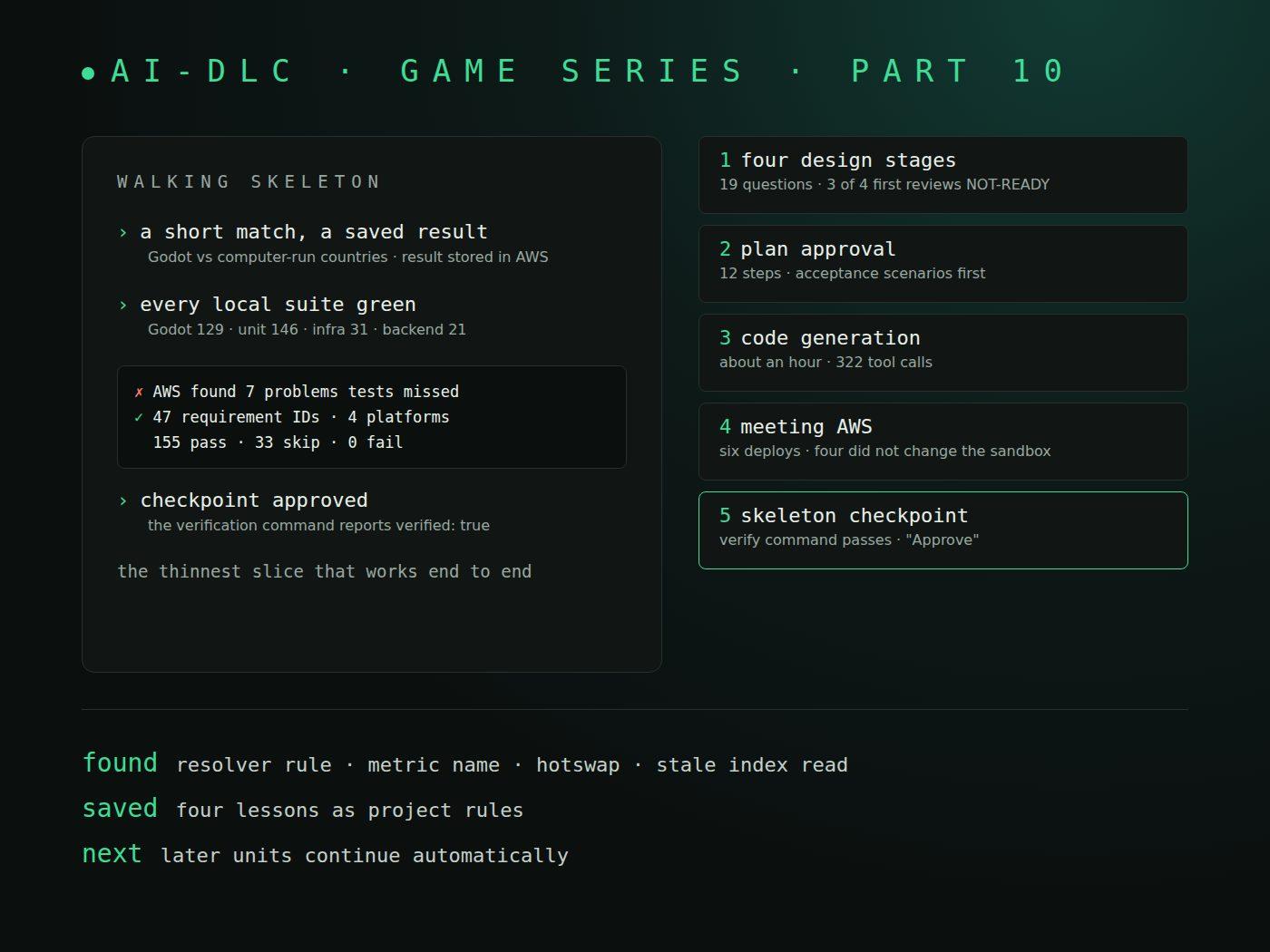
This is part 10 of a series on learning AI-DLC by building a game, World Rift Conflict, in Godot with an AWS backend. Part 8 planned the work, and part 9 told one deploy error from the middle of this post. This post covers the whole first unit: the walking skeleton, from its design to my approval.
Parts so far:
- Part 1: setup
- Part 2: a proof of concept
- Part 3: automated E2E tests
- Part 4: what the reviews caught
- Part 5: inside a stage
- Part 6: a bugfix intent
- Part 7: ideation
- Part 8: inception
- Part 9: an AppSync deploy error
- Part 10: walking skeleton (this post)
TL;DR
- The
mvpscope declaresskeleton: on, so the first unit runs every design stage and Code Generation before any other unit starts, and it ends at a human checkpoint. - Four design stages asked 19 questions plus one follow-up. Three of the four first reviews said NOT-READY.
- Code Generation built the unit in about an hour and 322 tool calls. Every local suite passed.
- The real backend still found seven problems the local tests could not see, from a resolver rule in AppSync to a metric name that does not exist.
- The final run passed 47 requirement IDs across four platforms with 0 failures. I approved the skeleton and let the later units continue automatically.
What a walking skeleton is in AI-DLC
A walking skeleton is the thinnest slice of a product that works from end to end. For this game it is a short match against computer-run countries in the web build, plus the signed-in player's result saved to the backend. Live online matches are not part of it.
In AI-DLC it is more than a habit. The mvp scope declares skeleton: on, and Construction runs unit by unit with checkpoints on. So the first unit, u1-skeleton-match, goes through every per-unit stage, Code Generation included, before any later unit starts.
These unit stages have no approval gate of their own. Each one is reviewed and recorded as complete. The approval comes once, at the skeleton checkpoint, and only after the Construction Verification Command passes. That command was approved during delivery planning:
npm test && npm run lint && npm run check:backend && npm run check:secrets && npm run e2e
The last part, npm run e2e, runs the game against a real test backend on AWS. A first design-stage review cannot stand in for it.
Four design stages
Each stage asked its questions, I confirmed a summary ("Looks correct"), the agent wrote the artifacts, and a reviewer checked them.
Functional design asked six questions about the game itself. The score is growth from the country's own start, in percent. The player splits 100 points between priorities. The computer picks "Whatever raises its score most this round". The skeleton has 4 countries and 2 events, and a round lasts 60 seconds. The result was 24 rules, BR1.1 to BR9.2. The first review said NOT-READY with 4 Major findings: reopening the country card was covered nowhere, leaving a match was not modelled, events had no target, and the Country shape disagreed with the approved contract. All were fixed, and the second review said READY.
NFR requirements asked six questions, and I picked the recommended answer each time. The result store is Amplify Gen 2 data: an AppSync GraphQL API over DynamoDB. An unsaved result stays on the device. Spending alerts fire at $10, $25 and $40 actual and $50 forecast, and an alarm fires above 5 store errors an hour. The review said READY but raised 2 Major findings. One was that a result waiting on a shared device has no owner, so a second player could receive it.
NFR design asked four questions. Each save runs one database transaction, and each waiting result carries its owner's user id. The first review said NOT-READY with 3 Major findings, and the second said READY. Two unknowns were left as checks for later: how the API's error metric counts errors, and whether repeated saves settle in time.
Infrastructure design asked three questions: a separate CDK app for the alert stack, one shared alert topic, and deletion protection on production tables only. The first review said NOT-READY with 3 Major findings. The most useful was that "alerts before costs" had no mechanical gate. The fix was a read-only command, npm run ops:check-alerts, that must pass before the test backend is deployed.
The second review then caught the agent itself. The revision had moved to one table, GameData, when I had confirmed two, and nobody had asked me. AI-DLC asked a follow-up question, and I chose "A. One table".
Code Generation
Code Generation starts with Plan Approval. Until I approved the plan, the engine blocked every shell command that could change files:
Code generation cannot run mutation-capable shell commands for unit u1-skeleton-match because the plan, unit-test instructions, and current Testing Contract do not have a current matching approval.
The plan had 12 steps and put the acceptance scenarios first, the order our practices ask for: acceptance checks first, unit tests after. Before writing it, the agent named the Godot patterns it picked and the ones it rejected. It chose one scene per screen under a composition root, not one large dashboard scene. It chose an enum state machine, not one node per state. I answered "Approve Plan".
The developer agent then built all 12 steps. It took about an hour and 322 tool calls. The pre-push check passed all nine of its steps:
| Suite | Result |
|---|---|
| Godot (gdUnit4) | 129 test cases, 0 failures (100 new) |
| TypeScript unit tests | 146 pass |
| Infrastructure tests | 31 pass |
| Backend tests | 21 pass |
| New TypeScript line coverage | 81.6% to 100% per file |
The code review said READY with 5 Minor findings. The two acceptance scenarios were written but not run, because they need AWS.
Meeting AWS
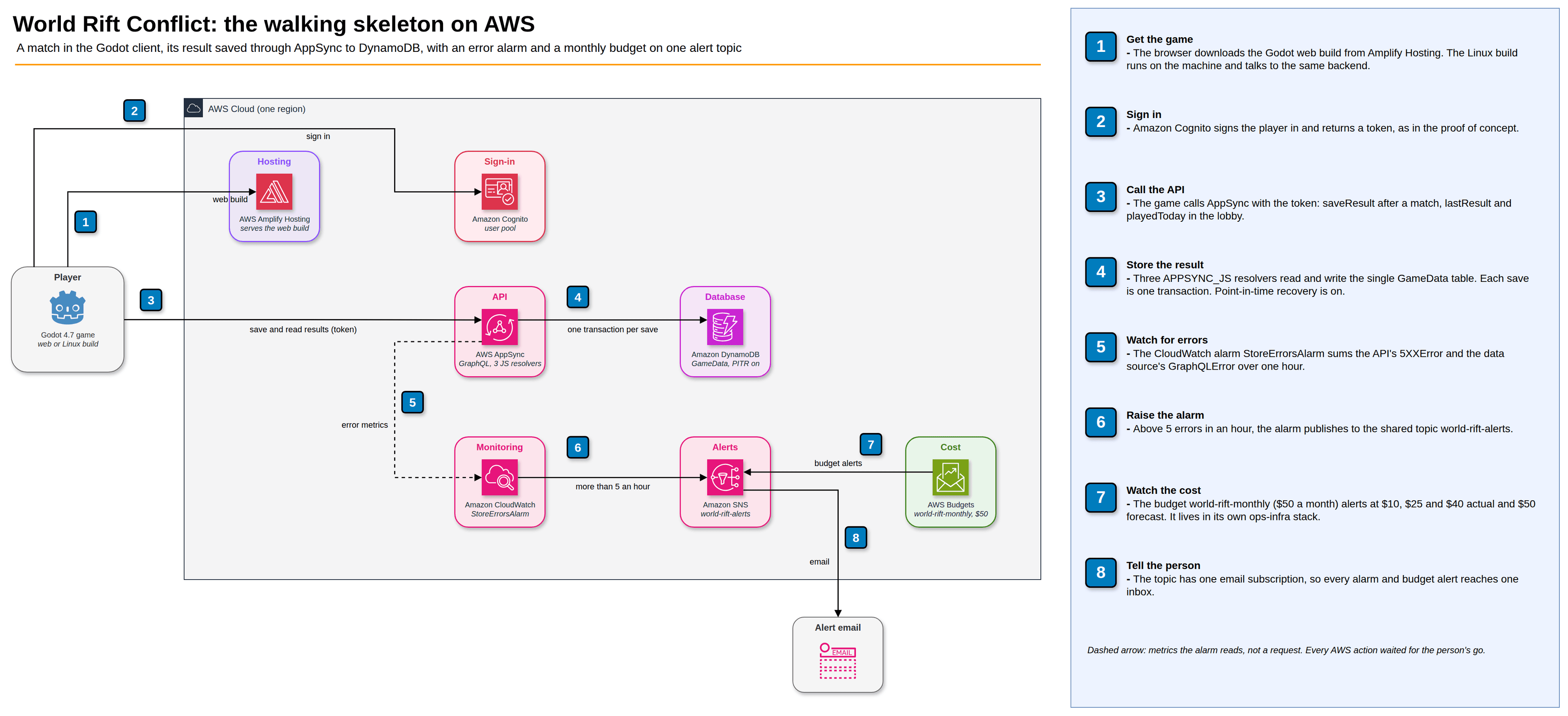
Every AWS action waits for my go. Before asking, the agent checks read-only what my role can do. That check found that my Amplify sign-in role could not read SNS topics, AWS Budgets or CloudWatch alarms, so the alert gate could never pass. I added a small inline read policy. The alert stack deployed, and the gate failed once more, correctly, because I had not yet confirmed the alert email.
Then the test backend deploys started, and the surprises came one after another.
- AppSync refused the resolvers. All three JavaScript resolvers failed with "The code contains one or more errors." The cause was an APPSYNC_JS rule that Node and the lint both miss. Part 9 tells that story.
- The alarm watched a metric that does not exist. The first end-to-end run expected the alarm sum to move by 1 and read "Expected: 1 Received: 0". A read-only
list-metricscall showed that AppSync names the per-data-source error countGraphQLError, notErrorsas the design said. I chose "A. Use GraphQLError". The synth test was changed first and failed, then the code was fixed. - The fix did not reach the sandbox. The redeploy printed an error, yet the deploy script recorded it as done. The output showed why: "HotswapFailed ... is not authorized to perform: cloudformation:UpdateResource". An Amplify sandbox always deploys with CDK hotswap, which edits a changed alarm with my own credentials. And
ampxexited 0 after the failure, so the script printed PASS. The agent fixed the script test-first, so any[ERROR]line now counts as a failure. For the alarm, I chose "B. Rename the alarm once": a new name turns the edit into a replacement, which goes through a normal CloudFormation deploy. - Two tests shared one address. The same first run failed sign-up with "Sign-up failed: User already exists". The sign-in scenario and the skeleton scenario built the same test address in one run on one platform. A failing unit test came first, then the fix.
In total the sandbox was deployed six times. Four of those deploys did not change it: three rolled back, and one failed while reporting success.
The verification command and the checkpoint
With the backend deployed, the full command passed: exit 0, with the end-to-end run taking 2.9 minutes. That was not the end. AI-DLC runs the approved command itself to verify the checkpoint, and its first run failed with two new errors that my run had missed.
- A stale read in the lobby. On Firefox the lobby showed "Last match: place 4 of 4, score 0, Kenya (left)" instead of "Last match: place 1 of 4, score 1133, Kenya". After a save, the lobby asks for the last result through a DynamoDB index, and index reads are eventually consistent. Just after the save, the index still answered with the previous match and overwrote the newer result. This was a real game bug. The fix came test-first: two gdUnit4 tests, then the profile keeps whichever result finished later.
- A late datapoint in the alarm test. On Linux the alarm check read "Expected: 1 Received: 2". The test's window started 60 seconds back, inside the minute of an earlier duplicate save whose datapoint arrived late. The window now starts on the next full minute.
The second verify passed with verified: true. The run's own report only knew the sign-in requirements, so the results per requirement and platform were built from the scenario tags in the run log:
| Measure | Count |
|---|---|
| Requirement IDs | 47 |
| Pass cells (requirement × platform) | 155 |
| Skip cells | 33 |
| Failures | 0 |
The skips are by design. The result-store API checks run once per run, on Linux, and are skipped on Chromium, Firefox and WebKit. Two performance targets, frame rate and first load, are not measured yet and stay listed as gaps.
At the checkpoint AI-DLC asked "Anything to add for next time?". I saved four lessons as project rules: check AppSync resolvers with EvaluateCode first, check a metric name before designing an alarm on it, read a tool's error lines and not only its exit code, and expect index reads to lag. Then it asked me to approve the verified unit, and I answered "Approve".
What it cost and what it bought
The developer agent's build took about an hour and 322 tool calls. The deploys took six attempts. The infrastructure design estimated the running cost at most about $2.30 a month for both backends, usually under $0.10, from published list prices, because the pricing tool failed in that session.
What it bought is a list of problems that only the real backend could show: the AppSync export rule, the regex in a resolver, the metric name, the hotswap limit, the deploy wrapper trusting an exit code, the shared test address and the stale index read. Each one was found in the first unit, on a slice with one table and three resolvers. None of them waits for a later unit with live matches.
After the approval, AI-DLC asked "How should I continue building the remaining work?". I chose "Continue automatically". The ordinary completion approvals of later units stop coming to me. Plan approvals, summary confirmations, failures and every AWS go still do.
What is next
The next unit is U2, accounts and profile. It starts with its own functional design.