
Generative AI on AWS: GenU vs the Amplify AI Kit, compared
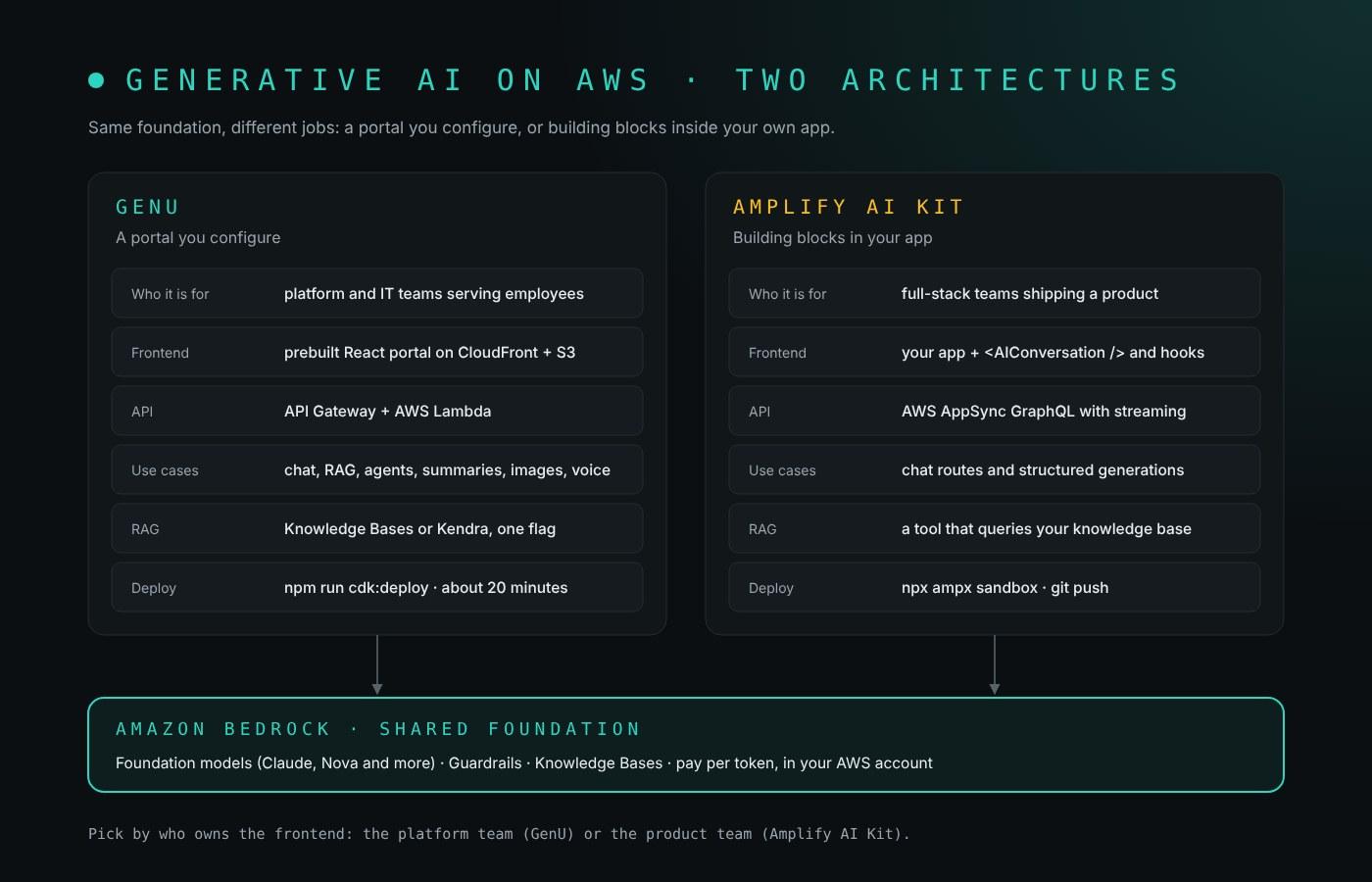
Every time someone asks me "how do I build a generative AI app on AWS?", the honest answer starts with another question: who owns the frontend? If it is a platform team that wants to give a whole company safe access to generative AI, AWS already ships a finished app for that: the Guidance for Rapidly Deploying Generative AI for Business Use Cases on AWS, better known by its sample, GenU. If it is a product team adding AI to an app they already ship, the shortest path I know is the Amplify AI Kit, which is how I build AI features on Amplify Gen 2.
This post draws both architectures, shows what deploying each one looks like, and compares them side by side, so you can pick one (or both) without reading two sets of docs.
Last checked: October 25, 2026.
TL;DR
- GenU is a complete, open-source generative AI portal: chat, RAG chat, agents, summarization, translation, image and video generation, voice chat and a no-code Use Case Builder, deployed with one
npm run cdk:deployin about 20 minutes. - The Amplify AI Kit is not an app; it is a set of AI routes you declare in your Amplify Data schema, plus React hooks and UI components to call them. A conversation route is a streaming, multi-turn chat; a generation route is a single typed query.
- Both run on Amazon Bedrock in your own account, both are serverless and pay-per-use, and neither adds a markup on model tokens.
- Choose GenU for internal productivity across many employees; choose the Amplify AI Kit when generative AI is a feature of a product you ship; combine them on one shared knowledge base when both are true.
The building blocks both architectures share
Every generative AI app on AWS combines the same four layers, and the two architectures differ mostly in how much of the last one you write yourself:
- Models: Amazon Bedrock serves foundation models from Anthropic, Amazon, Meta, Mistral and others through one serverless API; Amazon SageMaker AI hosts models you train or fine-tune yourself.
- Knowledge: retrieval-augmented generation (RAG) grounds answers in your documents, through Bedrock Knowledge Bases or Amazon Kendra.
- Actions: agents and tools let the model call APIs, query databases or search the web.
- App shell: authentication, an API, a frontend, chat history and monitoring.
If you want the full list of what Bedrock itself shipped and when, I keep a Bedrock features timeline.
Architecture 1: GenU, the enterprise portal
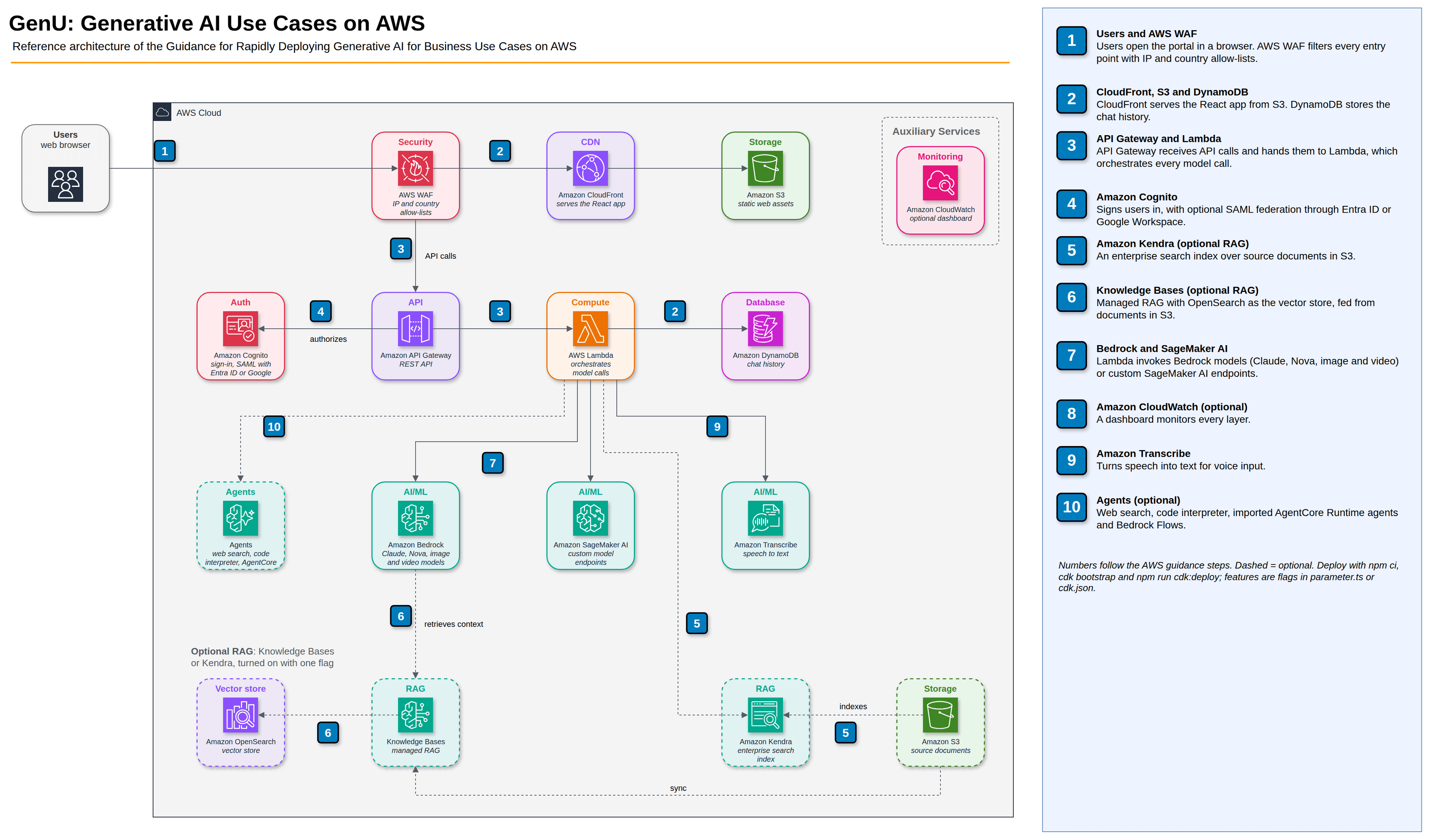
The AWS guidance is implemented by the open-source Generative AI Use Cases (GenU) repository. It is a TypeScript monorepo with a React frontend and an AWS CDK backend, and what you deploy is a working portal, not a starter kit.
How a request flows
- A user opens the portal in a browser; AWS WAF filters every entry point and can restrict access by IP range or country.
- CloudFront serves the static React app from S3; chat history lives in DynamoDB.
- API Gateway receives API calls and hands them to Lambda.
- Cognito signs users in, with optional SAML federation (the docs cover Entra ID and Google Workspace).
- Lambda calls Amazon Bedrock (or a SageMaker AI endpoint) and returns the answer.
- If RAG is on, Lambda first retrieves context from Bedrock Knowledge Bases (vectors in OpenSearch) or an Amazon Kendra index, both fed by documents in S3.
- Amazon Transcribe handles voice input, and optional agents add web search, a code interpreter, imported AgentCore Runtime agents and Bedrock Flows.
What you get out of the box
Chat, text generation, summarization, meeting minutes, writing assistance, translation, web content extraction, image and video generation, video analysis, diagram generation and voice chat. Business users can add their own use cases with the Use Case Builder by writing a prompt template, with no code.
How you deploy it
git clone https://github.com/aws-samples/generative-ai-use-cases.git
cd generative-ai-use-cases
npm ci
npx -w packages/cdk cdk bootstrap
npm run cdk:deploy
The first deploy takes about 20 minutes. Features are flags in packages/cdk/parameter.ts or cdk.json, and envs in parameter.ts gives you separate dev and prod settings:
// packages/cdk/parameter.ts (excerpt)
const envs = {
  dev: {
    ragKnowledgeBaseEnabled: true,
    allowedIpV4AddressRanges: ['203.0.113.0/24'],
    allowedCountryCodes: ['US', 'ES'],
  },
}
If you do not want a local CDK setup, the repo also has a deploy.sh script that runs the whole deployment from AWS CloudShell.
Best for: platform or IT teams who want to give many employees governed access to generative AI quickly, then grow it from there.
Architecture 2: the Amplify AI Kit
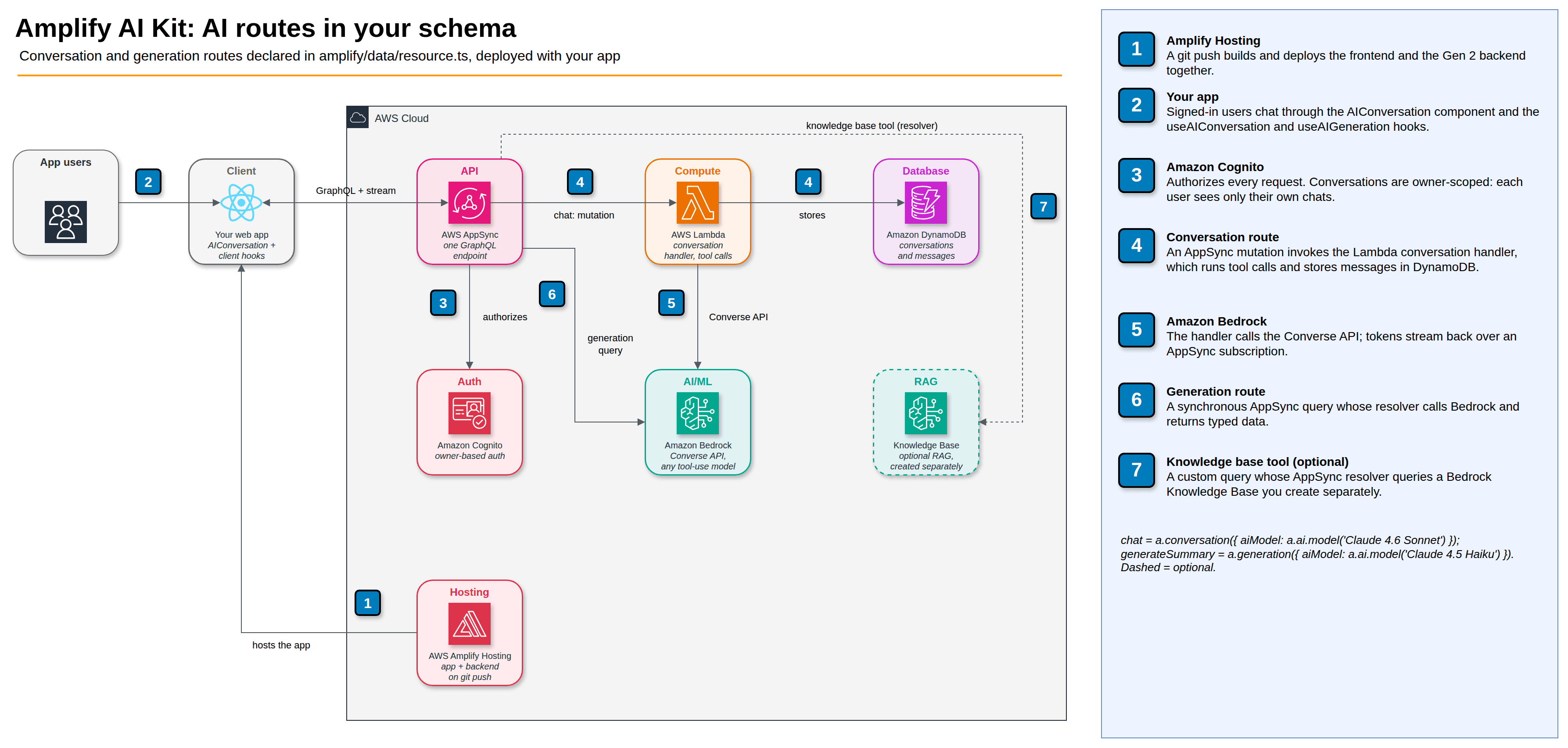
The Amplify AI Kit is part of Amplify Gen 2, where the whole backend is TypeScript. You add AI the same way you add a data model: by declaring AI routes in amplify/data/resource.ts. Amplify then provisions AppSync, Lambda, DynamoDB and the Bedrock permissions for you.
Two kinds of route
| Route | What it is | Auth | Typical use |
|---|---|---|---|
| Conversation | Asynchronous, multi-turn chat; messages stored in DynamoDB automatically, replies streamed over a subscription | Owner-based only: each user sees their own chats | Chat assistants, conversational search |
| Generation | Synchronous request-response AppSync query that returns data in the shape you define | Non-owner: authenticated, guest, group or API key | Summaries, alt text, structured extraction |
Models must support tool use in Bedrock's Converse API, because the AI Kit uses tools for both route types. Tools are also how a conversation reaches your data: a data tool exposes an Amplify Data model or custom query to the model, and a knowledge base tool is a custom query with an AppSync resolver that calls a Bedrock knowledge base. The knowledge base itself you create separately, in the console, the CLI or CDK.
What the code looks like
The backend:
// amplify/data/resource.ts
import { a, defineData, type ClientSchema } from '@aws-amplify/backend'

const schema = a.schema({
  chat: a
    .conversation({
      aiModel: a.ai.model('Claude 4.6 Sonnet'),
      systemPrompt: 'You are a helpful assistant',
    })
    .authorization((allow) => allow.owner()),

  generateSummary: a
    .generation({
      aiModel: a.ai.model('Claude 4.5 Haiku'),
      systemPrompt: 'Summarize the text in three sentences.',
    })
    .arguments({ text: a.string() })
    .returns(a.customType({ summary: a.string() }))
    .authorization((allow) => allow.authenticated()),
})

export type Schema = ClientSchema<typeof schema>
export const data = defineData({ schema })
The frontend, with the prebuilt chat component:
// src/Chat.tsx
import { Authenticator } from '@aws-amplify/ui-react'
import { AIConversation } from '@aws-amplify/ui-react-ai'
import { useAIConversation } from './client'

export default function Chat() {
  const [
    {
      data: { messages },
      isLoading,
    },
    handleSendMessage,
  ] = useAIConversation('chat')

  return (
    <Authenticator>
      <AIConversation
        messages={messages}
        isLoading={isLoading}
        handleSendMessage={handleSendMessage}
      />
    </Authenticator>
  )
}
a.ai.model() takes friendly names (Claude 4.6 Sonnet and Opus, Claude 4.5 Haiku, Amazon Nova and others as of the March 2026 docs). For a newer Bedrock model that is not in the list yet, pass its model ID instead: aiModel: { resourcePath: '<bedrock-model-id>' }.
How you deploy it
npm create amplify@latest
npm add aws-amplify @aws-amplify/ui-react @aws-amplify/ui-react-ai
npx ampx sandbox
The sandbox deploys a personal cloud backend while you develop. When you are ready, push a branch: Amplify Hosting builds and deploys the frontend and the backend together. If your app is Next.js, I wrote about the SSR details in deploying Next.js 16 on Amplify.
Best for: product teams adding generative AI features to a customer-facing or internal app they already own.
Side by side
| Dimension | GenU | Amplify AI Kit |
|---|---|---|
| What you get | A complete multi-use-case portal | AI routes, hooks and UI components for your app |
| Who it is for | Platform and IT teams serving employees | Full-stack teams building a product |
| Infrastructure as code | AWS CDK, flags in parameter.ts or cdk.json | Amplify Gen 2 TypeScript (CDK underneath) |
| API layer | API Gateway + Lambda | AppSync GraphQL: queries, mutations, subscriptions |
| Frontend | Prebuilt React portal on CloudFront + S3 | Your own React, Next.js, Vue, Angular or React Native app |
| Auth | Cognito, optional SAML, WAF IP and country rules | Cognito; chats are owner-scoped |
| Models | Bedrock models plus SageMaker AI endpoints | Bedrock models with Converse API tool use |
| RAG | Built in: Knowledge Bases or Kendra, one flag | A tool that queries a knowledge base you build |
| Agents and tools | Web search and code interpreter agents, AgentCore import, Use Case Builder | Tools over your data models, custom queries and functions |
| Modalities | Text, images, video, voice | Text first; extend with your own functions |
| Time to first value | About 20 minutes for one CDK deploy | Minutes in a sandbox, then a git push |
| Customization | Fork the repo and change an existing app | Unlimited: it is your app |
| Cost model | Pay-per-use, plus Kendra or OpenSearch if RAG is on | Pay-per-use AppSync, Lambda, DynamoDB and Bedrock |
The biggest cost in both is model tokens. After that, watch the always-on part of RAG: a Kendra index or an OpenSearch collection bills whether anyone asks a question or not. GenU links to AWS pricing calculator estimates for three setups (no RAG, RAG with Kendra, RAG with Knowledge Bases); for the Amplify AI Kit, Bedrock is billed on demand with no Amplify markup.
The hybrid: one knowledge layer, two front doors
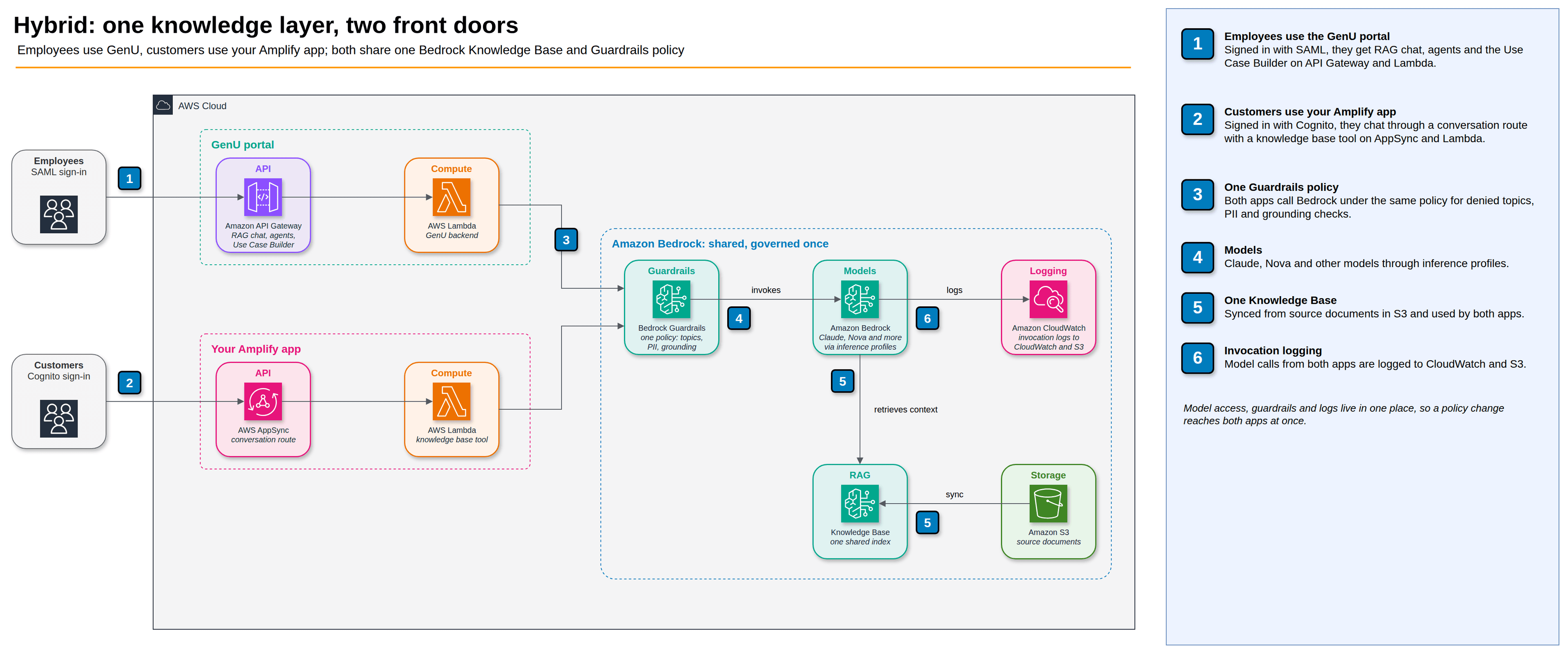
The two are not exclusive, and in practice this is where many teams end up. GenU gives employees a portal on day one; the Amplify app gives customers an AI feature inside the product. Both point at the same Bedrock Knowledge Base, synced from the same S3 bucket, and run under the same Guardrails policy. Governance then lives once in Bedrock instead of once per app: when legal changes a denied topic, both front doors pick it up.
How to choose
- Choose GenU when the goal is internal productivity: many employees, many use cases, a security team that wants WAF, SAML and a published AWS reference architecture, and no appetite to build a UI.
- Choose the Amplify AI Kit when generative AI is a feature of a product you ship: a support chat in your SaaS app, structured extraction in a form, summaries in a dashboard.
- Combine them when both are true, on one shared knowledge base.
Whichever you pick, do three things before real users arrive: confirm the models you need are available in your Region in the Bedrock console, set an AWS Budgets alert on Bedrock spend, and attach a Guardrails policy.
Sources
- Guidance for Rapidly Deploying Generative AI for Business Use Cases on AWS
- Generative AI Use Cases (GenU) on GitHub
- GenU deploy options
- GenU: deploy from CloudShell
- Amplify AI Kit: architecture
- Amplify AI Kit: set up AI
- Amplify AI Kit: models and pricing
- Amplify AI Kit: knowledge base
- AWS blog: Build fullstack AI apps in minutes with the new Amplify AI Kit