
Learning AI-DLC building a game, part 13: a UI pass and a release
This is part 13 of a series on learning AI-DLC by building a game, World Rift Conflict, in Godot with an AWS backend. Part 1 set it up, and part 11 ended with the first real play of the game, which showed a screen that did not fit the window. This one follows the piece of work that fixed it, to its last stage.
Parts so far:
- Part 1: setup
- Part 2: a proof of concept
- Part 3: automated E2E tests
- Part 4: what the reviews caught
- Part 5: inside a stage
- Part 6: a bugfix intent
- Part 7: ideation
- Part 8: inception
- Part 9: an AppSync deploy error
- Part 10: walking skeleton
- Part 11: retrospective
- Part 12: guards and hooks
- Part 13: a UI pass and a release
- Part 14: the memory layers
- Part 15: the agents and roles
TL;DR
- I played the live game, took four screenshots of what was wrong, and gave them to AI-DLC as a new piece of work. It ran the
classicplan: six units of work, then one Build and Test stage for all of them. - Every test passed, and two faults were still on screen. The pictures the end-to-end run saves for me showed an empty box where an arrow should be, and a selection ring with its top and bottom cut off. Build and Test sent both back to Code Generation.
- The nearly empty screen from my first screenshot was reproduced in a real browser, by running the old commit next to the new one. The old off-screen check had passed it.
- Build and Test found that one requirement, a keyboard-only round, had no check in a real build, and added one.
- The last requirement was the first desktop release. The release command had been built and tested nine days earlier, but its download stack had never been deployed. The first real run found that out.
Where it started
The first real play of the web build was in part 11. The match screen was clipped on the left and at the top, with black bars on both sides. One screenshot showed an almost empty dark screen. I wrote it up and started a new piece of work with one line:
Improve the game's UI/UX: the match screen must fit the window at common sizes, show less text (short labels, help on demand), and add visuals (banner, map, country markers).
AI-DLC offered its classic plan: 15 stages and 15 approval gates. It skips Ideation, because the game's idea and scope were already settled. It starts with Reverse Engineering, because the code already existed. That scan explained most of the screenshots by reading alone. The game used a fixed 960 x 640 viewport, so it letterboxed at every window size. The dashboard's minimum size was larger than the viewport, so it clipped on all four sides. Then the scan found the gap that matters most for this post: no existing test could catch the clipping. The off-screen check measured each control against the screen's root, and the root grew with its content.
Inception cut the work into six units:
| Unit | What it built |
|---|---|
| Fit foundation | a layout that follows the window, and a test that compares each control with what the window shows |
| Assets and brand | a logo, a banner, country flags and a map |
| Match panels | the match screen rebuilt as panels, with help on demand and a menu |
| World map | the map with a marker for each country, built before the proposals panel at my choice |
| Proposals | a panel for treaties, trade and conflicts, with a flag on each row |
| Release | icons for every platform, and the checks on download size and load time |
What the tests could not see
The first Build and Test run, on 2026-11-07, had no failing test that came from the game. It found two faults in the kit itself, which it fixed, and then two in the game that no test was looking for.
At the Practices Discovery interview I had chosen how we judge that a screen fits and looks right. Tests measure every control's rectangle against the window and fail on clipping. The end-to-end run also saves a picture of each main screen at each size, for me to look at. Nothing compares those pictures automatically. How a screen looks stays my judgement.
The pictures showed:
- "You ▯ Papua New Guinea". The proposal line used an arrow, →, and the game's font has no glyph for it, so it drew an empty box. The ◆ in the real-data mark had the same problem.
- A ring with two edges. At the shortest layout, 1024 x 600, a selected marker's ring lost its top and bottom edges. The ring was drawn outside the marker, past the map's clipped area.
Build and Test does not fix faults in the code. It writes a loop-back, with a diagnosis, the stage where the cause lies, a planned fix and its cost, and sends the work back. Loop-back 1 went to Code Generation for two units. The proposal lines became plain words in both languages, such as "You to Papua New Guinea: treaty waiting". A new test now fails on any character in the game's text that the font cannot draw. The ring is now drawn inside the map's area.
Then Build and Test ran again.
The nearly empty screen, found in a browser
The almost empty screen in my first screenshot was the one fault reading could not explain. A headless sweep in the first unit found a likely cause, and the match panels unit fixed it with a regression test. The plan said the proof in a real browser would come at Build and Test.
The first Build and Test run did not do it. The check had been deferred in a unit's records, and the stage did not list the deferred checks before it started. The second run did. It checked out the old commit in a throwaway worktree, ran that commit's own test kit there, and played the same match in both builds. It used Spanish at 125% text size, because that is where the sweep had shown the overflow.
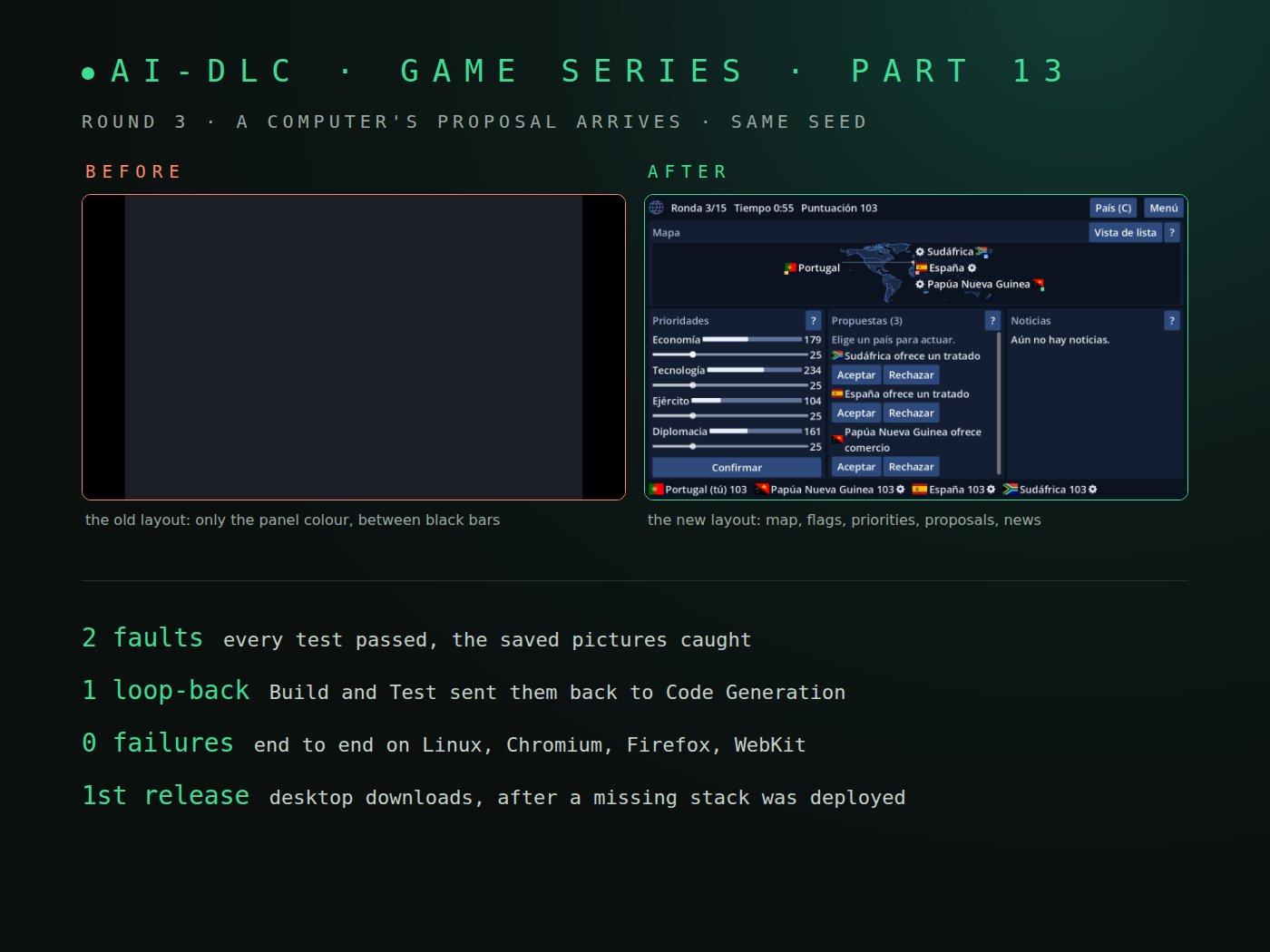
The old layout went blank exactly when a computer's proposal arrived in round 3. The cover of this post shows that moment in both builds. A proposal's label was laid out about 1 pixel wide, which stretched its row and then the whole screen root, so everything moved out of the window. The old off-screen check answered "nothing is off screen" both times, because it measured against that same root.
A gap the stage closed itself
One requirement asks that a keyboard-only player can finish a round. A scene test checked it, but no end-to-end scenario did in a real build. Build and Test treats a target with no evidence as a failure, so it added the step: during a whole round, the build's own Tab order must reach the four sliders, the four help buttons and the Lock in button, and Lock in must end the round. It passed on Linux, Chromium, Firefox and WebKit.
The release that had never run
The last requirement was the desktop release: once the web build passes, publish Windows, macOS and Linux downloads. Here AI-DLC's stage could only stop and ask, because the order is push main, which deploys production, then a passing web build, then my go, then the release. I push, never the agent. So the stage halted with two choices, "Accept failure" or "Abort". I asked a question instead: "do i push main to check desktop first?" Then I pushed.
The web build passed, and so did the production smoke check. Then the release met one obstacle after another:
- Claude Code's auto mode refused it, as a production deploy. I switched to manual approval.
- No AWS session in the environment. My sign-in was valid, but the script wants the session as environment variables.
- The git tree was not clean. I had blog drafts uncommitted. The agent set them aside and restored them after.
- The download stack did not exist. The release command had been built and tested in the earlier piece of work, against fakes and a test backend, but the stack it publishes to had never been deployed.
AI-DLC asked how to finish the stage, and I chose to deploy the stack. It is an S3 bucket and a CloudFront distribution with its certificate, costed at under $0.60 a month. The deploy script ran six read-only checks first, including that the budget alerts exist, and deployed in about seven minutes. Then the release ran: three builds, checks on size, secrets and signing, a round played by the Linux test build, and each published file downloaded back and compared with the one built.
One more snag came from AI-DLC itself. Setting my drafts aside with git stash also took the lines AI-DLC's hooks had just written to its audit log. Putting them back by hand was refused, because only AI-DLC's own tools may write the audit trail, the integrity check from part 12. The second try committed the record first and set aside only my own files.
I downloaded the Linux build from the game's download page, and it works. I have no Windows PC or Mac at hand, so those two are recorded as not yet run.
The numbers
| Measure | Result | Line |
|---|---|---|
| Godot unit and scene tests | 752, 0 failures, 87 s | at most 90 s |
| GDScript coverage | 90.2% | at least 80% |
| End-to-end failures, four platforms and pixel ratio 2 | 0 | 0 |
| Web first load at 25 Mbit/s, gzip | 5.6 s | under 20 s |
| Images added | 0.47 MB | at most 2 MB |
| Map frame rate at 1920 x 1080 | 60 per second | at least 30 |
| Desktop downloads | Windows 38.8 MB, macOS 61.5 MB, Linux 29.2 MB | 150 MB each |
What I would tell myself
- Keep the pictures, and look at them. Both loop-back faults passed every test. A picture per screen per size, judged by a person, found them in minutes.
- List the deferred checks before Build and Test starts. A check a unit leaves "for Build and Test" is easy to lose. The first run lost one.
- To prove a fix, run the old build too. The old commit in a throwaway worktree, with its own test kit, showed the fault at the first try.
- A command that needs infrastructure is not done until it has run once for real. The release command passed all its tests for nine days with no stack to publish to.
What is next
The UI work is finished and released: the web build is live, and the first desktop downloads are on the download page. Windows and macOS still need their first smoke check. The next piece of work is not chosen yet. Until then, more deep-dives from the same records.
The first of those deep-dives is part 14: how AI-DLC remembers what it learned.