
AWS Amplify features timeline: what shipped and how to use it
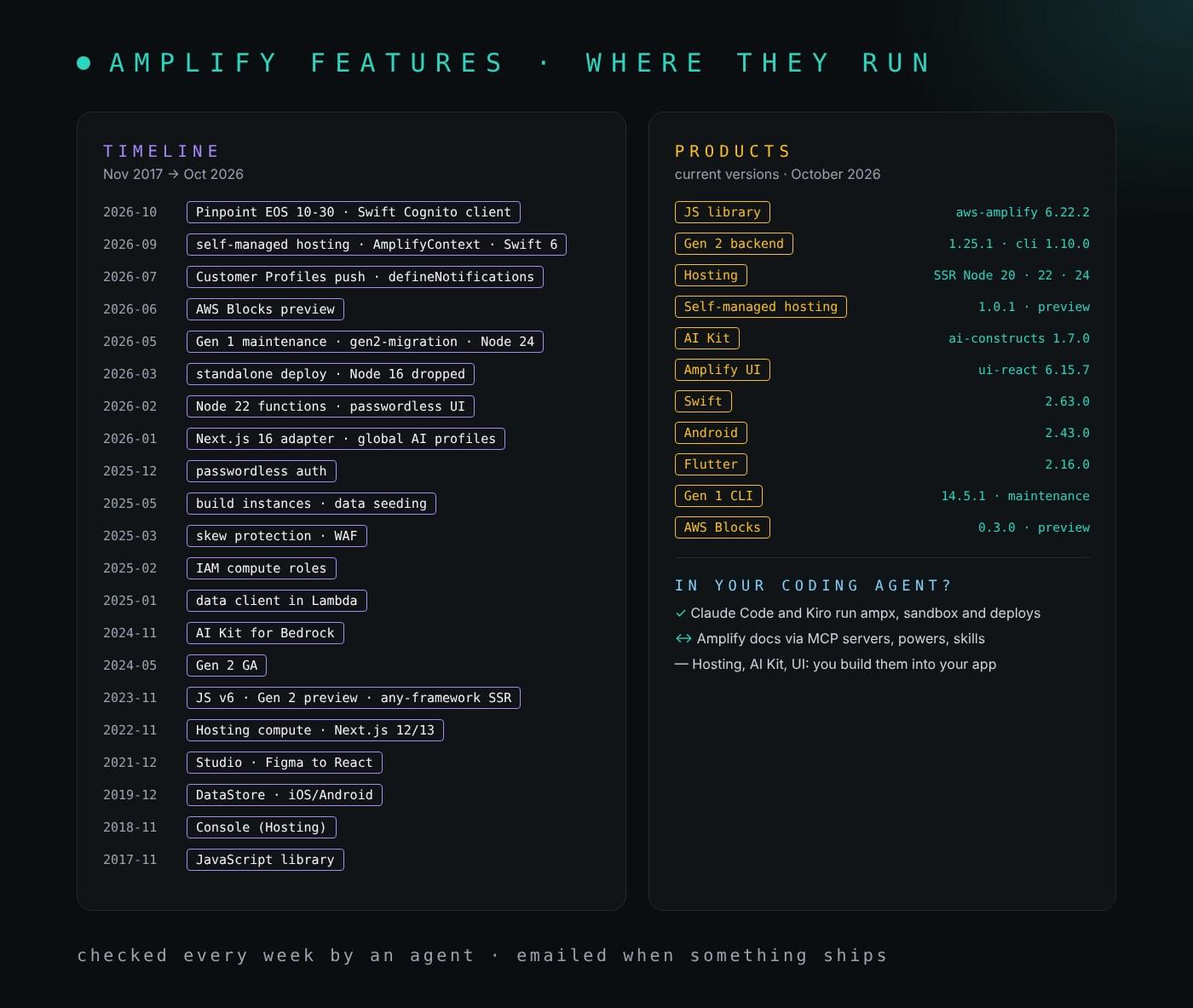
I build on Amplify, and Amplify changes in more places than any other AWS service I use: a changelog in one GitHub repository for the backend, another for the JavaScript library, three more for Swift, Android and Flutter, the Hosting document history, and only now and then an AWS What's New post. More than once I have found an Amplify feature months after it shipped, usually after working around the problem it solves. This post is the fix, built the same way as my Bedrock, Kiro and Claude timelines: a timeline of every notable feature on one side and the Amplify products that use it on the other, the current version or status of each product, how the feature reaches your coding agent (Kiro, Claude Code, AWS AI-DLC), and for the features that matter most, the best use case and an example you can run today.
Last checked: October 25, 2026. A scheduled agent re-reads Amplify's changelogs and AWS's announcements every week, updates this post and emails me the changes. How that works is at the end.
TL;DR
- Amplify is now four things: client libraries (JavaScript, Swift, Android, Flutter), a TypeScript backend layer on AWS CDK (Gen 2), Amplify Hosting with SSR compute, and since September 2026 a preview of self-managed hosting that deploys the frontend into your own account.
- Current state:
aws-amplify6.22.2,@aws-amplify/backend1.25.1 with@aws-amplify/backend-cli1.10.0,@aws-amplify/ui-react6.15.7, Swift 2.63.0, Android 2.43.0, Flutter 2.16.0. Hosting runs SSR on Node.js 20, 22 and 24. - The biggest shifts of the last year: Gen 1 is in maintenance mode (since May 1, 2026; end of life May 1, 2027) with a migration tool in developer preview; Amazon Pinpoint reaches end of support on October 30, 2026, so Analytics and Push move to Kinesis, Firehose and Customer Profiles; and Gen 2 learned to deploy without Amplify Hosting.
- In your coding agent: there is no Amplify-only MCP server. AWS ships an
aws-amplifyClaude Code plugin, anaws-amplifyKiro power and Agent Toolkit skills, all backed by the AWS MCP Server and its Amplify workflows. - If you adopt only five things: Gen 2 with per-developer sandboxes, data seeding, IAM compute roles for SSR, skew protection, and a plan to leave Gen 1 and Pinpoint.
The products and their current versions
| Product | What it is | Current version or status | Docs |
|---|---|---|---|
JavaScript library (aws-amplify) | Auth, Data, Storage, AI, Analytics and Push for web and React Native apps | 6.22.2 (Oct 13, 2026); v5 in maintenance; v4 and earlier unsupported since Apr 13, 2026 | amplify-js |
Gen 2 backend (@aws-amplify/backend) | The backend defined in TypeScript files, built on AWS CDK, and the ampx CLI | 1.25.1 (Sep 17, 2026); @aws-amplify/backend-cli 1.10.0 | Build a backend |
| Amplify Hosting | Managed CI/CD, branch deploys and SSR compute | SSR on Node.js 20, 22 and 24 (24 since May 4, 2026); Amazon Linux 2023 build image; the docs list Next.js 12 to 15 for managed SSR | User guide |
Self-managed hosting (@aws-amplify/hosting) | defineHosting() and definePipeline(): CloudFront, S3 and Lambda in your account | 1.0.1, preview since Sep 9, 2026 | Self-hosting |
AI Kit (@aws-amplify/ai-constructs, @aws-amplify/ui-react-ai) | Conversation and generation routes on Amazon Bedrock, plus React components | 1.7.0 and 1.5.2; global inference profiles since Jan 2026 | AI Kit |
Amplify UI (@aws-amplify/ui-react) | Authenticator, Storage Browser and components | 6.15.7 (Oct 2, 2026) | Amplify UI |
| Amplify Swift | iOS, macOS, watchOS and tvOS | 2.63.0 (Oct 24, 2026); Swift 6 language mode | amplify-swift |
| Amplify Android | Android library (v2) | 2.43.0 (Oct 23, 2026) | amplify-android |
| Amplify Flutter | iOS, Android, web and desktop from Dart | 2.16.0 (Oct 14, 2026) | amplify-flutter |
| Gen 1 CLI and Studio | amplify push, Studio and the Gen 1 backends | CLI 14.5.1; maintenance mode since May 1, 2026; end of life May 1, 2027 | Notice |
| DataStore | Offline-first sync over AppSync | Not supported in Gen 2; ends with Gen 1 | Gen 1 docs |
| AWS Blocks | Composable TypeScript backends that run locally and deploy as CDK | 0.3.0, preview since Jun 16, 2026; attaches to a Gen 2 backend | Announcement |
Gen 1 to Gen 2: the change that matters most in 2026
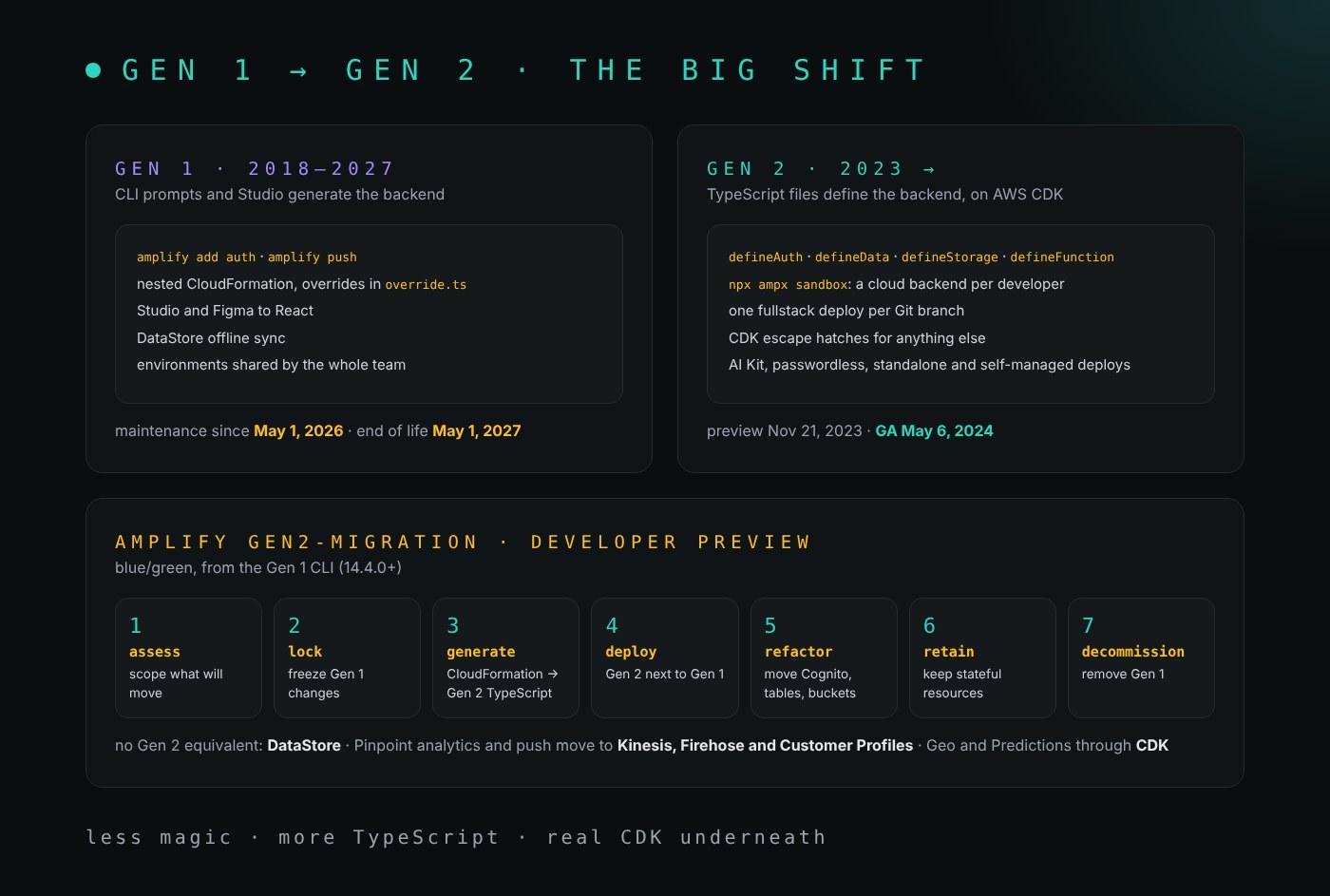
For six years, "an Amplify backend" meant Gen 1: answer CLI prompts with amplify add, run amplify push, and let Amplify generate nested CloudFormation that you customized through override files. Since May 2024 it means Gen 2: you write amplify/auth/resource.ts, amplify/data/resource.ts and friends in TypeScript, every developer gets a personal cloud sandbox, every Git branch gets its own fullstack deploy, and anything Amplify does not cover is plain CDK in the same project.
On May 1, 2026, Gen 1 entered maintenance mode: only critical bug fixes and security patches until its end of life on May 1, 2027. That covers the Gen 1 CLI, Studio and the Gen 1 backends; Gen 2, Hosting and the client libraries are not affected. The same day, CLI 14.4.0 shipped amplify gen2-migration, still a developer preview. It is a blue/green migration: Gen 2 is generated from your deployed stacks and deployed next to Gen 1, then the stateful resources (Cognito pools, DynamoDB tables, S3 buckets) are moved into it with CloudFormation stack refactoring, so your users and data stay where they are.
npm install -g @aws-amplify/cli@^14.4.0
amplify gen2-migration assess
amplify gen2-migration lock
amplify gen2-migration generate
# deploy the generated Gen 2 app, then:
amplify gen2-migration refactor --to <gen2-root-stack-name>
amplify gen2-migration retain
Three things do not come across. DataStore has no Gen 2 equivalent; use the Gen 2 data client with your own caching. Pinpoint-backed Analytics and Push end with Pinpoint on October 30, 2026; the libraries now point to Kinesis, Firehose and Customer Profiles. And categories such as Geo and Predictions become CDK you write yourself. The Amplify team says outright that the tool is not for production environments yet, so run assess on a copy first. If you have hit Gen 2 deploy errors before, my notes on circular dependencies and Lambda dependency errors cover the two I see most.
The timeline: feature ↔ products
Newest first. Amplify products are where you use the feature today, not only where it launched. The Coding agents column says how the feature reaches Kiro or Claude Code:
- ✓ your coding agent uses it directly: it runs the command (
ampx,amplify gen2-migration) while it works, - ↔ through a bridge: the
aws-amplifyClaude Code plugin or Kiro power, the AWS MCP Server's Amplify workflows, or a skill, - — something you build into your application; your agent helps you write it.
The ★ rows have a use case and an example further down.
| Date | Feature | Amplify products | Coding agents |
|---|---|---|---|
| 2026‑10‑30 | Amazon Pinpoint end of support: Pinpoint-backed Analytics and Push stop being supported | JavaScript, Swift, Android, Flutter | — |
| 2026‑10‑24 | AmplifyCognitoClient (beta): a standalone, multi-session Cognito client | Swift 2.63 | — |
| 2026‑09‑23 | Swift 6 language mode, with Sendable across every plugin | Swift 2.62 | — |
| 2026‑09‑15 | createAmplifyContext(): isolated contexts per request or tenant; auth events across tabs | JavaScript 6.21 | — |
| 2026‑09‑09 | ★ Self-managed hosting (preview): defineHosting(), definePipeline() and ampx deploy into your own account | Gen 2 backend, @aws-amplify/hosting | ✓ ampx deploy |
| 2026‑07‑30 | Customer Profiles push provider and Connect clients | JavaScript 6.20, Swift 2.59, Android 2.39, Flutter 2.14 | — |
| 2026‑07‑29 | defineNotifications backed by Customer Profiles | Gen 2 backend | — |
| 2026‑07‑21 | Pinpoint deprecation warnings in Analytics; auto-tracking for Kinesis and Firehose | JavaScript 6.19 | — |
| 2026‑06‑16 | ★ AWS Blocks (preview): composable, local-first TypeScript backends that deploy as CDK | AWS Blocks, Gen 2 backend | ↔ aws-blocks skill |
| 2026‑05‑28 | keepOnDelete for storage; stackMappings spreads resolvers across nested stacks | Gen 2 backend | — |
| 2026‑05‑14 | gen2-migration adds social sign-in, custom CDK resources, overridden resolvers and retain | Gen 1 CLI 14.5 | ✓ amplify gen2-migration |
| 2026‑05‑05 | Server-side uploadData | JavaScript 6.17 | — |
| 2026‑05‑04 | Node.js 24 for SSR apps | Hosting | — |
| 2026‑05‑01 | ★ Gen 1 maintenance mode, end of life May 1, 2027; amplify gen2-migration (developer preview) | Gen 1 CLI, Studio, DataStore | ✓ amplify gen2-migration |
| 2026‑04‑13 | amplify-js v4 and earlier reach end of support | JavaScript | — |
| 2026‑03‑25 | Node.js 16 dropped for functions | Gen 2 backend | — |
| 2026‑03‑11 | Standalone deployment: a Gen 2 backend without Amplify Hosting | Gen 2 backend | ✓ ampx |
| 2026‑02‑10 | Node.js 22 by default for functions, Node.js 24 as an option | Gen 2 backend | — |
| 2026‑02‑05 | Passwordless in the Authenticator | Amplify UI 6.14 | — |
| 2026‑01‑27 | Global cross-Region inference profiles | AI Kit | — |
| 2026‑01‑18 | Gen 1 to Gen 2 migration tool (beta) | Gen 1 CLI | ✓ CLI |
| 2026‑01‑16 | Durable functions configuration; descriptions on function schedules | Gen 2 backend | — |
| 2026‑01‑15 | Next.js 16 in the Next.js adapter | JavaScript (adapter-nextjs 1.7) | — |
| 2025‑12‑08 | Passwordless sign-in | Gen 2 backend 1.19 | — |
| 2025‑05‑29 | Build instances: Standard, Large (16 GB) and XLarge (72 GB) | Hosting | — |
| 2025‑04‑29 | ★ Data seeding for sandboxes | Gen 2 backend | ✓ ampx sandbox seed |
| 2025‑03‑26 | ★ AWS WAF integration GA | Hosting | — |
| 2025‑03‑13 | ★ Skew protection | Hosting | — |
| 2025‑02‑18 | ★ IAM compute roles for SSR apps | Hosting | — |
| 2025‑01‑28 | Amplify Data client inside Lambda functions | Gen 2 backend | — |
| 2024‑11‑19 | ★ AI Kit for Amazon Bedrock: conversation and generation routes, AIConversation | AI Kit, Amplify UI | — |
| 2024‑06‑01 | Amplify iOS v1 and Android v1 deprecated | Swift, Android | — |
| 2024‑05‑06 | ★ Gen 2 GA: TypeScript backends, per-developer sandboxes, fullstack branch deploys | Gen 2 backend, Hosting | ✓ ampx sandbox |
| 2023‑11‑21 | Gen 2 preview | Gen 2 backend | — |
| 2023‑11‑20 | SSR for any framework through a deployment specification: Nuxt, Astro, SvelteKit | Hosting | — |
| 2023‑11‑15 | ★ JavaScript v6: tree-shakable functional APIs and Next.js server support | JavaScript | — |
| 2023‑06‑29 | Monorepo support: npm, Yarn and pnpm workspaces, Turborepo, Nx | Hosting | — |
| 2023‑06‑27 | watchOS and tvOS | Swift | — |
| 2023‑04‑20 | Amplify Flutter v1 in Dart, with web and desktop | Flutter | — |
| 2022‑12‑13 | Android v2 GA; JavaScript v5 | Android, JavaScript | — |
| 2022‑11‑17 | Hosting compute with Next.js 12 and 13: middleware, ISR, image optimization | Hosting | — |
| 2022‑11‑16 | In-App Messaging GA | JavaScript | — |
| 2022‑10‑18 | Amplify Swift v2, a full Swift rewrite | Swift | — |
| 2022‑04‑21 | Studio GA with Figma to React | Studio | — |
| 2021‑12‑02 | Amplify Studio (preview) replaces Admin UI | Studio | — |
| 2021‑11‑19 | Authenticator component for React, Angular and Vue | Amplify UI | — |
| 2021‑09‑30 | Amplify Geo GA with Amazon Location Service | JavaScript | — |
| 2021‑05‑18 | Next.js SSR on Hosting | Hosting | — |
| 2021‑02‑15 | Amplify Flutter GA | Flutter | — |
| 2020‑12‑01 | Admin UI | Admin UI | — |
| 2020‑08‑20 | Amplify Flutter (developer preview) | Flutter | — |
| 2019‑12‑04 | DataStore; Amplify iOS and Android libraries | JavaScript, iOS, Android | — |
| 2018‑11‑26 | Amplify Console, now Amplify Hosting | Hosting | — |
| 2018‑08 | Amplify CLI | Gen 1 CLI | — |
| 2017‑11‑21 | Amplify JavaScript library | JavaScript | — |
Best use cases, with an example for each
Grouped by what they help you do, not by date. Each one says when it pays off and gives an example you can paste.
Define a backend in TypeScript: Gen 2, sandboxes and seeding
Gen 2 (GA May 2024) · Gen 2 backend. Each resource is a TypeScript file. Auth, data and authorization rules live next to each other, and the Schema type flows to your frontend.
Best for: any new Amplify app, and any app where two developers keep overwriting each other's backend changes.
// amplify/data/resource.ts
import { a, defineData, type ClientSchema } from '@aws-amplify/backend';

const schema = a.schema({
  Todo: a.model({
      content: a.string(),
      isDone: a.boolean()
    })
    .authorization(allow => [allow.publicApiKey()])
});

export type Schema = ClientSchema<typeof schema>;

export const data = defineData({
  schema,
  authorizationModes: {
    defaultAuthorizationMode: 'apiKey',
    apiKeyAuthorizationMode: { expiresInDays: 30 }
  }
});
// in the frontend
import { generateClient } from 'aws-amplify/data'
const client = generateClient<Schema>()
await client.models.Todo.create({ content: "...", isDone: false })
Data seeding (Apr 2025) fills a sandbox with test users and records, so a fresh sandbox is usable in one command. Install @aws-amplify/seed, write amplify/seed/seed.ts, and run it:
npm install @aws-amplify/seed --save-dev
npx ampx sandbox
npx ampx sandbox seed
In your coding agent ✓: Claude Code and Kiro run npx ampx sandbox and npx ampx sandbox seed themselves, and --stream-function-logs lets them read function logs while they fix a bug. On Linux, the sandbox's file watcher can hit a system limit; I wrote up the fix. If a build cannot find amplify_outputs.json, see this one.
Leave Gen 1 before it leaves you: the migration tool
Gen 1 maintenance mode and amplify gen2-migration (May 2026) · Gen 1 CLI. The commands are in the section above.
Best for: every team still on amplify push. You have until May 1, 2027, and the safest order is to assess now, migrate a non-production environment, and replace DataStore and Pinpoint first, because those have no automatic path.
Run SSR safely: compute roles, skew protection and WAF
IAM compute roles (Feb 2025), skew protection (Mar 2025) and AWS WAF (Mar 2025) · Hosting. A compute role gives your SSR code AWS permissions without access keys in environment variables; you set it under App settings → IAM roles → Compute role, with a trust policy for amplify.amazonaws.com. Skew protection routes each browser to the server code of the deploy it loaded, so a deploy in the middle of a session does not break it; turn it on per branch under Branch settings → Actions → Enable skew protection and redeploy. WAF attaches a web ACL to the app for managed rules, rate limits and geo-blocking, at $15 per app per month plus WAF's own charges.
Best for: any production SSR app. A compute role replaces secrets you would otherwise bake into the build; skew protection removes a class of "it broke right after the deploy" bugs; WAF earns its fee as soon as a form or API route gets abused.
These are console settings, so there is no code to paste. The trade-off they remove is real on this site: see the practical case below.
Pick where the frontend runs: Hosting, standalone and self-managed
Hosting compute (Nov 2022, any framework Nov 2023), standalone deployment (Mar 2026) and self-managed hosting (preview, Sep 2026) · Hosting, Gen 2 backend. Managed Hosting is still the simplest path. Self-managed hosting is for teams that need the CloudFront distribution, buckets and functions in their own account, for example to meet a compliance rule or to own the WAF and logging setup. Best for: self-managed hosting when Amplify Hosting is ruled out by policy; managed Hosting everywhere else. It is a preview, so not for production yet.
npm add @aws-amplify/hosting
// amplify/hosting.ts
import { defineHosting } from '@aws-amplify/hosting';

export const hosting = defineHosting({
  framework: 'nextjs',
  buildCommand: 'npm run build',
  buildOutputDir: '.next'
});
npx ampx deploy --identifier my-app             # backend, frontend and hosting
npx ampx deploy --identifier my-app --frontend  # frontend only
definePipeline() adds a CodePipeline that deploys each stage on push, and defineHosting takes domain, waf and compute options. On managed Hosting, the docs list Next.js 12 to 15; the Next.js adapter supports 16 since January 2026, and I describe what it took to run Next.js 16 on Amplify SSR and which Node version builds your app.
Add generative AI from the schema: the AI Kit
AI Kit for Amazon Bedrock (Nov 2024; global inference profiles Jan 2026) · AI Kit, Amplify UI. A conversation route is a streaming chat with history saved for each user; a generation route returns typed, structured output from one request. Both are part of your data schema, so authorization works the same as for a model. Best for: a support chat or a "draft this for me" button in an app that already uses Amplify Data, without running your own Bedrock proxy.
// inside a.schema({ ... }) in amplify/data/resource.ts
  chat: a.conversation({
    aiModel: a.ai.model('Claude 4.5 Haiku'),
    systemPrompt: 'You are a helpful assistant',
  })
  .authorization((allow) => allow.owner()),

  generateRecipe: a.generation({
    aiModel: a.ai.model('Claude 4.5 Haiku'),
    systemPrompt: 'You are a helpful assistant that generates recipes.',
  })
  .arguments({ description: a.string() })
  .returns(a.customType({ name: a.string(), ingredients: a.string().array(), instructions: a.string() }))
  .authorization((allow) => allow.authenticated()),
import { generateClient } from "aws-amplify/api";
import { createAIHooks } from "@aws-amplify/ui-react-ai";
export const client = generateClient<Schema>({ authMode: "userPool" });
export const { useAIConversation, useAIGeneration } = createAIHooks(client);
// in a component:
const [{ data: { messages }, isLoading }, handleSendMessage] = useAIConversation('chat');
The AI Kit's model list currently stops at the Claude 4.5 and 4.6 families, which run through global inference profiles; newer Claude models arrive on Bedrock first, as my Bedrock timeline shows. I compare the AI Kit with AWS's GenU in GenU vs the Amplify AI Kit.
Compose backends: AWS Blocks
AWS Blocks (preview, Jun 2026) · AWS Blocks, Gen 2 backend. Each Block is a self-contained capability (Postgres, realtime messaging, key-value storage, background jobs, AI agents) that runs fully on your laptop without an AWS account and deploys as CDK. In a Gen 2 project it deploys as a nested stack and reuses the Amplify Cognito user pool. The Amplify docs present it as a complement to Gen 2, not a replacement. Best for: a capability Gen 2 does not cover well, such as Postgres or background jobs, in a new, non-critical part of an app. Keep Gen 2 as the backbone while Blocks is a preview.
npx @aws-blocks/create-blocks-app
Run at the root of a Gen 2 project, it detects amplify/backend.ts, creates aws-blocks/ and amplify/blocks.ts, and wires them into the backend. In your coding agent ↔: the aws-blocks skill in the Agent Toolkit's aws-core plugin.
Write smaller, typed clients: JavaScript v6 and the native rewrites
JavaScript v6 (Nov 2023), Swift v2 (Oct 2022, Swift 6 mode Sep 2026), Android v2 (Dec 2022) and Flutter v1 in Dart (Apr 2023) · client libraries. v6 replaced class-based APIs with functions you import one by one, which cut a sample Auth and Storage app from 77 KB to 31 KB, and added Next.js server support.
Best for: every app still on JavaScript v5 or older, or on the v1 native libraries, which no longer get fixes. Gen 2 needs aws-amplify 6.2.0 or later.
import { signIn } from 'aws-amplify/auth'
How Amplify integrates with Kiro, Claude Code and AWS AI-DLC
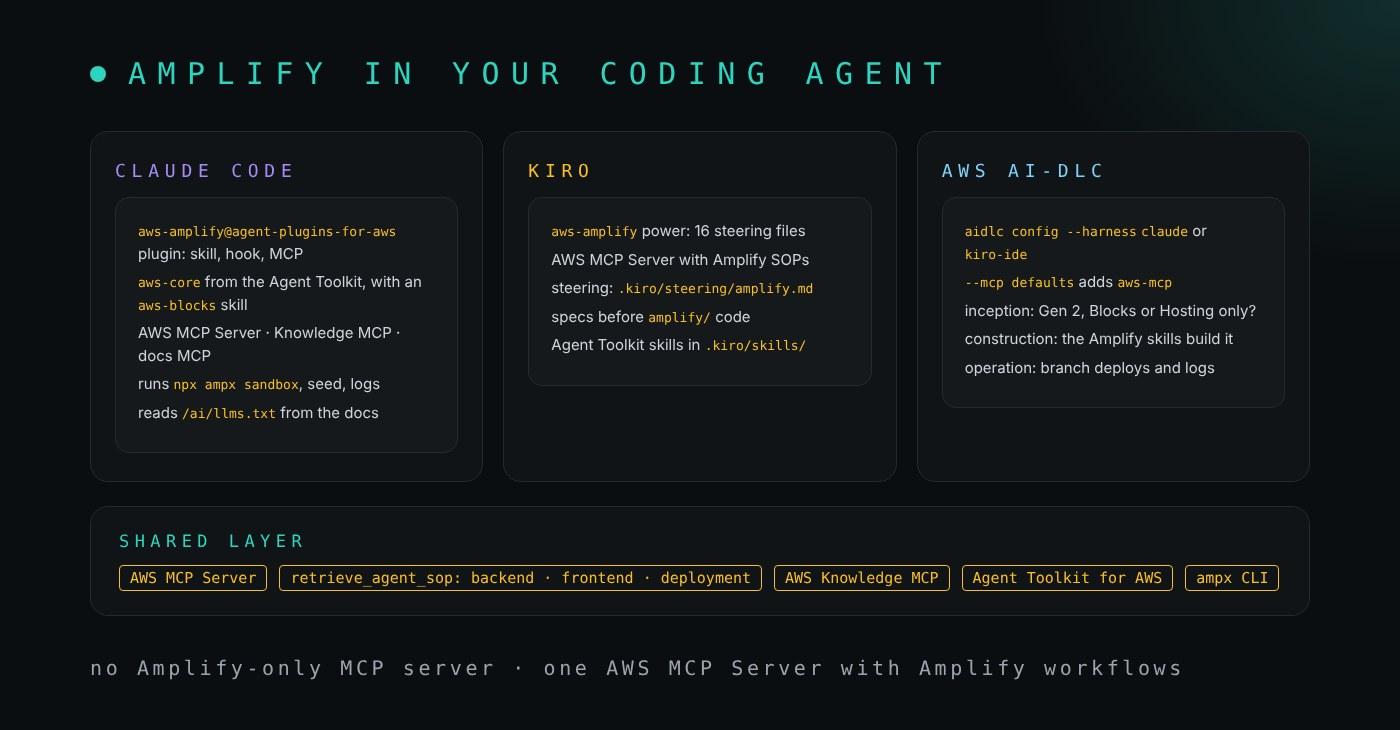
Amplify is not something your coding agent runs on, the way Claude Code runs on Bedrock. It is something your agent builds with, and AWS now ships the pieces for that. There is no Amplify-only MCP server; the Amplify docs point to the AWS MCP Server, which hosts three Amplify workflows ("agent SOPs") that an agent loads with retrieve_agent_sop: amplify-backend-implementation, amplify-frontend-integration and amplify-deployment-guide.
Claude Code: the aws-amplify plugin
The Amplify docs recommend the aws-amplify plugin from AWS's own marketplace (Claude Code 2.1.29 or later). It bundles an amplify-workflow skill, a hook that checks prerequisites, and the AWS MCP Server:
/plugin marketplace add awslabs/agent-plugins
/plugin install aws-amplify@agent-plugins-for-aws
The Agent Toolkit for AWS, which AWS describes as the successor to its earlier MCP servers and plugins, is on Anthropic's default marketplace. Its aws-core plugin includes the aws-blocks skill:
/plugin install aws-core@claude-plugins-official
If you prefer a documentation server and nothing else, the remote AWS Knowledge MCP Server needs no AWS credentials and covers the Amplify docs:
claude mcp add --scope project --transport http aws-knowledge https://knowledge-mcp.global.api.aws
The Amplify docs also publish llms.txt and llms-full.txt under https://docs.amplify.aws/ai/, plus a Markdown copy of each page, which is handy when you paste a page into a prompt. I keep track of what changes on the Claude side in my Claude features timeline.
Kiro: the aws-amplify power
In Kiro, install the aws-amplify power ("Build full-stack apps with AWS Amplify Gen2") from the Powers panel. It needs no manual configuration: it brings 16 steering files (scaffolding, auth, data, storage, functions, AI, deployment and more, for web and mobile) and this MCP entry, which also works as is in .kiro/settings/mcp.json:
{
  "mcpServers": {
    "aws-mcp": {
      "command": "uvx",
      "timeout": 100000,
      "transport": "stdio",
      "args": [
        "mcp-proxy-for-aws@latest",
        "--log-level",
        "ERROR",
        "https://aws-mcp.us-east-1.api.aws/mcp"
      ]
    }
  }
}
The Amplify docs suggest a steering file so Kiro always reaches for those workflows:
# Amplify Development Guidelines

When working on Amplify projects, use the AWS MCP Server guided workflows:

- For backend features (auth, data, storage, functions, AI), call `retrieve_agent_sop` with `amplify-backend-implementation`
- For frontend integration, call `retrieve_agent_sop` with `amplify-frontend-integration`
- For deployment tasks, call `retrieve_agent_sop` with `amplify-deployment-guide`
Save it as .kiro/steering/amplify.md. Write the requirements as a Kiro spec first, then let the power build the amplify/ files; I show how I chain specs and hooks in Kiro workflows and track Kiro's own changes in the Kiro timeline.
AWS AI-DLC: the process around it
AI-DLC is AWS's method for building with agents: Inception, Construction and Operation, with a team validating the AI's questions at each gate. It installs as a harness for Claude Code or Kiro, and --mcp defaults adds the AWS MCP Server:
curl -fsSL https://github.com/awslabs/aidlc-workflows/releases/latest/download/install.sh | sh
aidlc config --harness claude --mcp defaults   # or --harness kiro-ide
aidlc doctor
AI-DLC does not mention Amplify, and it does not need to: in Inception, the mob decides whether a feature needs a Gen 2 backend, a Block, or only Hosting settings; in Construction, the Amplify plugin or power builds it; in Operation, branch deploys and CloudWatch logs give the team the evidence for the next gate. I compare AI-DLC with Anthropic's playbook and my own workflow in Anthropic's AI SDLC vs AWS AI-DLC vs Cursor pstack vs my workflow.
How Amplify integrates with the AWS ecosystem
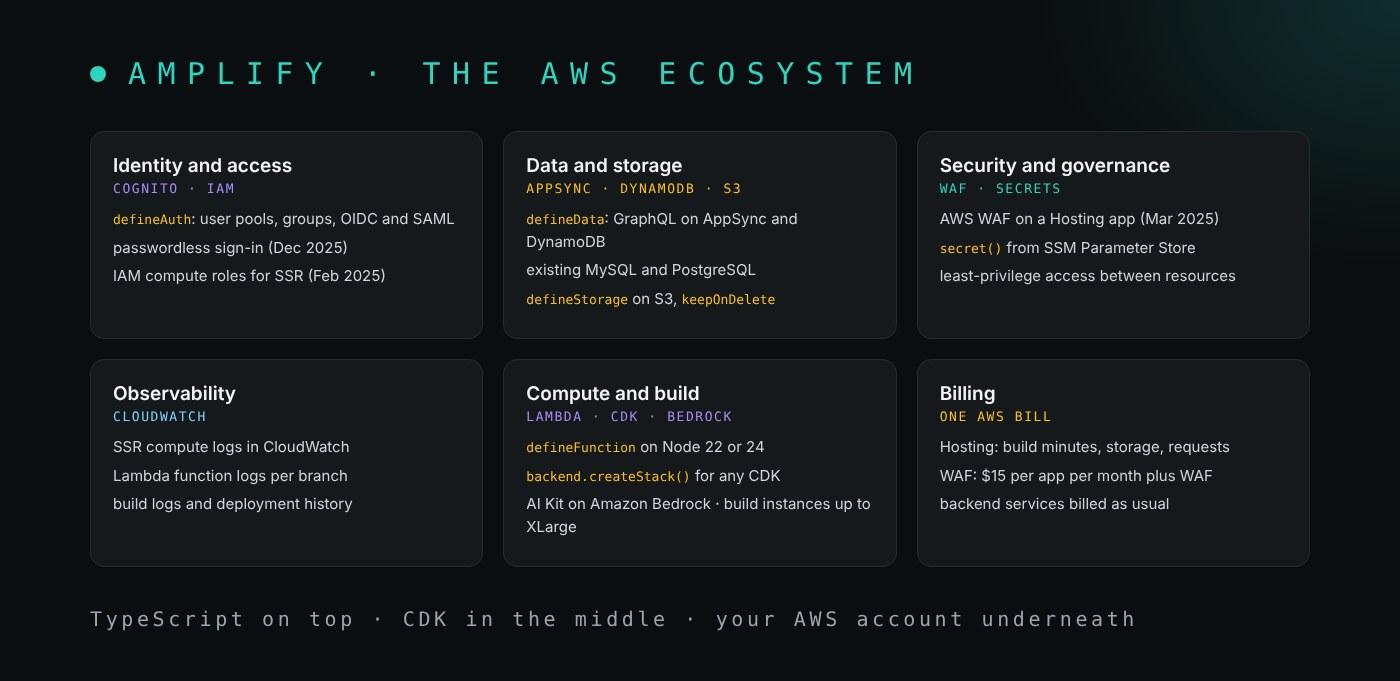
Amplify's value is that it is a thin TypeScript layer over services you already know, so everything it creates is an ordinary AWS resource in your account:
- Identity and access.
defineAuthcreates a Cognito user pool with groups and external identity providers, including passwordless sign-in. For developers, the setup guide uses IAM Identity Center with theAmplifyBackendDeployFullAccesspolicy. Cognito has limits that bite later; user pool attributes cannot be changed once created. - Data and storage.
defineDatabuilds an AppSync GraphQL API over DynamoDB, or connects to an existing MySQL or PostgreSQL database;defineStoragecreates an S3 bucket with path-based rules. - Security and governance.
secret()values live in SSM Parameter Store, per branch or shared; AWS WAF protects Hosting apps; IAM compute roles keep keys out of SSR environments. - Observability. SSR and function logs go to CloudWatch;
defineDatacan turn on AppSync logging with a retention period. - Compute and build. Functions are Lambda on Node.js 22 or 24, and anything else is CDK:
backend.createStack()adds your own stack, andbackend.data.resourcesexposes the generated ones.
// amplify/backend.ts
const customResourceStack = backend.createStack('MyCustomResources');
new sqs.Queue(customResourceStack, 'CustomQueue');

const { cfnResources } = backend.data.resources;
for (const table of Object.values(cfnResources.amplifyDynamoDbTables)) {
  table.pointInTimeRecoveryEnabled = true;
}
- Billing. Hosting charges per build minute, GB stored, GB served and SSR request, WAF adds a flat $15 per app per month, and the backend services bill as they would without Amplify. The AI Kit's Bedrock usage is billed by Bedrock. For per-branch costs and limits, see why every Amplify branch needs its own Stripe webhook.
A practical case: moving this site's newsletter key out of the build
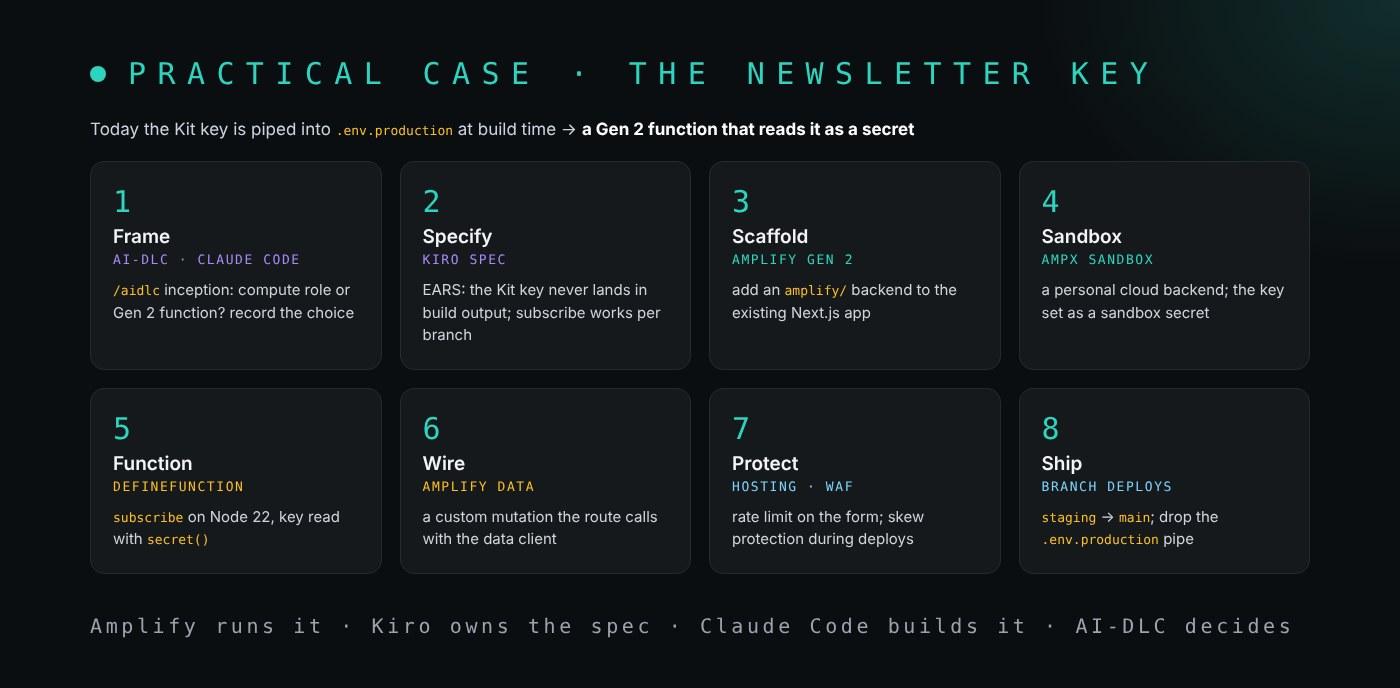
This site is a Next.js app on Amplify Hosting SSR with no Gen 2 backend. Its newsletter sign-up is a route handler that calls Kit, and because Hosting environment variables are build-time only, the build pipes the Kit key into .env.production so the server can read it. The comment in amplify.yml records that as a trade-off: a small blast radius versus standing up a Gen 2 backend for one call. Two features in this timeline remove that trade-off, so here is the plan I would follow. It is a plan, not something already in the repository.
- Frame it (AI-DLC). Run
/aidlc Move the Kit key out of the buildin Claude Code. Inception weighs the two options: an IAM compute role that reads the key from a secret store at runtime, or a Gen 2 function that holds the key and that the route calls. The second also gives the site a backend for later features, so I would record that choice and the reason. - Specify (Kiro). Turn the decision into a Kiro spec with EARS requirements: THE SYSTEM SHALL NOT include the Kit key in any build artifact; WHEN a reader subscribes on a branch deploy THE SYSTEM SHALL use that branch's key.
- Scaffold (Gen 2). Add an
amplify/backend to the existing app withnpm create amplify@latest, with theaws-amplifypower or plugin filling in the files. - Sandbox.
npx ampx sandboxgives me a personal backend, andnpx ampx sandbox secret set KIT_API_KEYstores the key there, never in Git. - Function. A
subscribefunction on Node.js 22 reads the key throughsecret(), the same pattern as the docs' example:
import { defineFunction, secret } from '@aws-amplify/backend';

export const subscribe = defineFunction({
  environment: {
    KIT_API_KEY: secret('KIT_API_KEY')
  }
});
- Wire it (Amplify Data). A custom mutation with
.handler(a.handler.function(subscribe)), called from the existing route handler with the server data client,generateServerClientUsingCookies. - Protect (Hosting). A WAF rate-limit rule in front of the form, and skew protection so a deploy during a sign-up does not send the form to the wrong server code.
- Ship. Branch deploys keep the
staging→maingate; the build addsnpx ampx pipeline-deploy --branch $AWS_BRANCH --app-id $AWS_APP_IDtoamplify.yml, and the line that pipesKIT_variables into.env.productiongoes away. The TypeScript error only CI could see is the one to watch for whenamplify_outputs.jsonfirst enters the build.
This is the architecture after step 8, with the six requests in order:
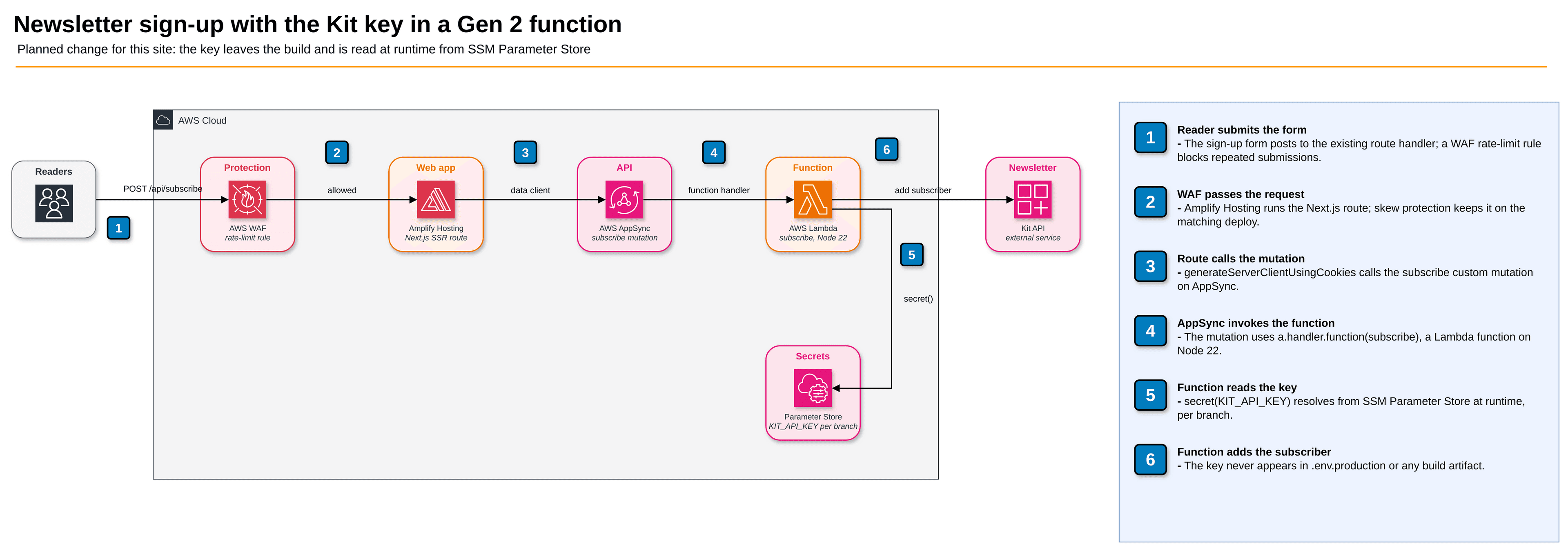
The split is the same as in my other timelines. Amplify runs it; Kiro owns the spec; Claude Code does the building; AI-DLC makes the decision explicit before any code exists. If you work as a forward deployed engineer, this is the kind of change a client's team can review in one pull request and own afterwards. Questions about your own setup are welcome through the contact page.
How this post stays up to date
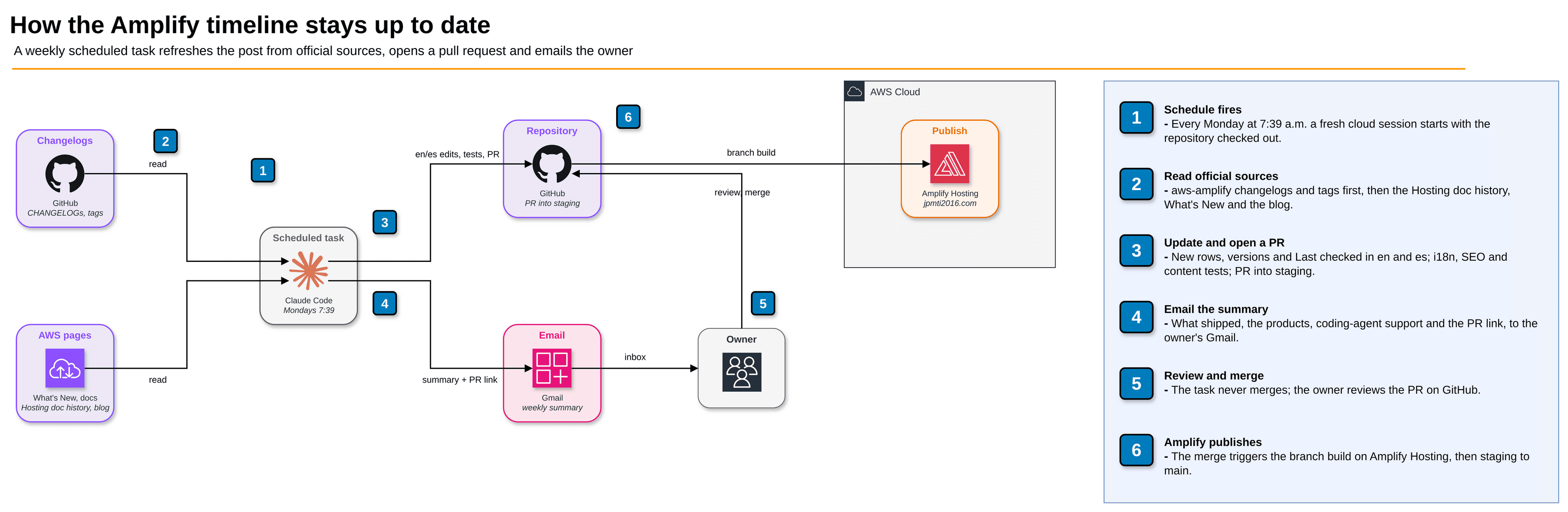
My Bedrock, Kiro and Claude timelines use the same setup, so I copied it:
- A scheduled task in Claude Code on the web runs every Monday morning in a fresh cloud session with this repository checked out.
- It follows a skill in the repository,
.claude/skills/amplify-features-update/SKILL.md. Because Amplify announces most changes only in changelogs, the skill reads the official sources in this order: the CHANGELOG files and release tags of amplify-backend, amplify-js, amplify-ui, amplify-swift, amplify-android, amplify-flutter and amplify-cli; the Hosting document history; AWS What's New; and the Front-End Web & Mobile blog. Press and community posts only point it to things to confirm there. - It adds new rows to the timeline, updates the products table, the versions and the "Last checked" date in both languages, runs the site's tests, and opens a pull request into
staging. - It emails me a summary: what is new, which Amplify products it touches, how it reaches Kiro or Claude Code, and a link to the pull request. If nothing changed, the email says so in one line.
If you want the same thing without a repository, a Claude scheduled task or a Kiro Automation with the prompt "every Monday, list what AWS Amplify shipped since last Monday from the aws-amplify GitHub changelogs and email it to me" gets you most of the way.
Sources
- Changelogs and tags: amplify-backend, amplify-js, amplify-ui, amplify-swift, amplify-android, amplify-flutter and amplify-cli
- Gen 1: maintenance mode notice, migration tool discussion and migrating an existing app
- Pinpoint migration, self-managed hosting and AWS Blocks (preview)
- Gen 2: GA announcement, preview blog, AI Kit, data client in Lambda and data seeding
- Hosting: compute roles, skew protection, build instances, WAF pricing, SSR support and Next.js 12 and 13 on compute
- History: Amplify JavaScript launch, DataStore, Studio and JavaScript v6
- Coding agents: AWS MCP Server, awslabs/agent-plugins, Agent Toolkit for AWS, Kiro aws-amplify power, awslabs/mcp, Claude Code MCP and awslabs/aidlc-workflows